VPN. GRE and DMVPN
Assignment
Goal: Configure GRE between the Moscow and St. Petersburg offices. Configure DMVPN between Moscow and Chokurdakh/Labytnangi.
- Configure GRE between the Moscow and St. Petersburg offices
- Configure DMVPN between Moscow and Chokurdakh/Labytnangi
- All nodes in all offices must have IP connectivity
- Document the plan and changes
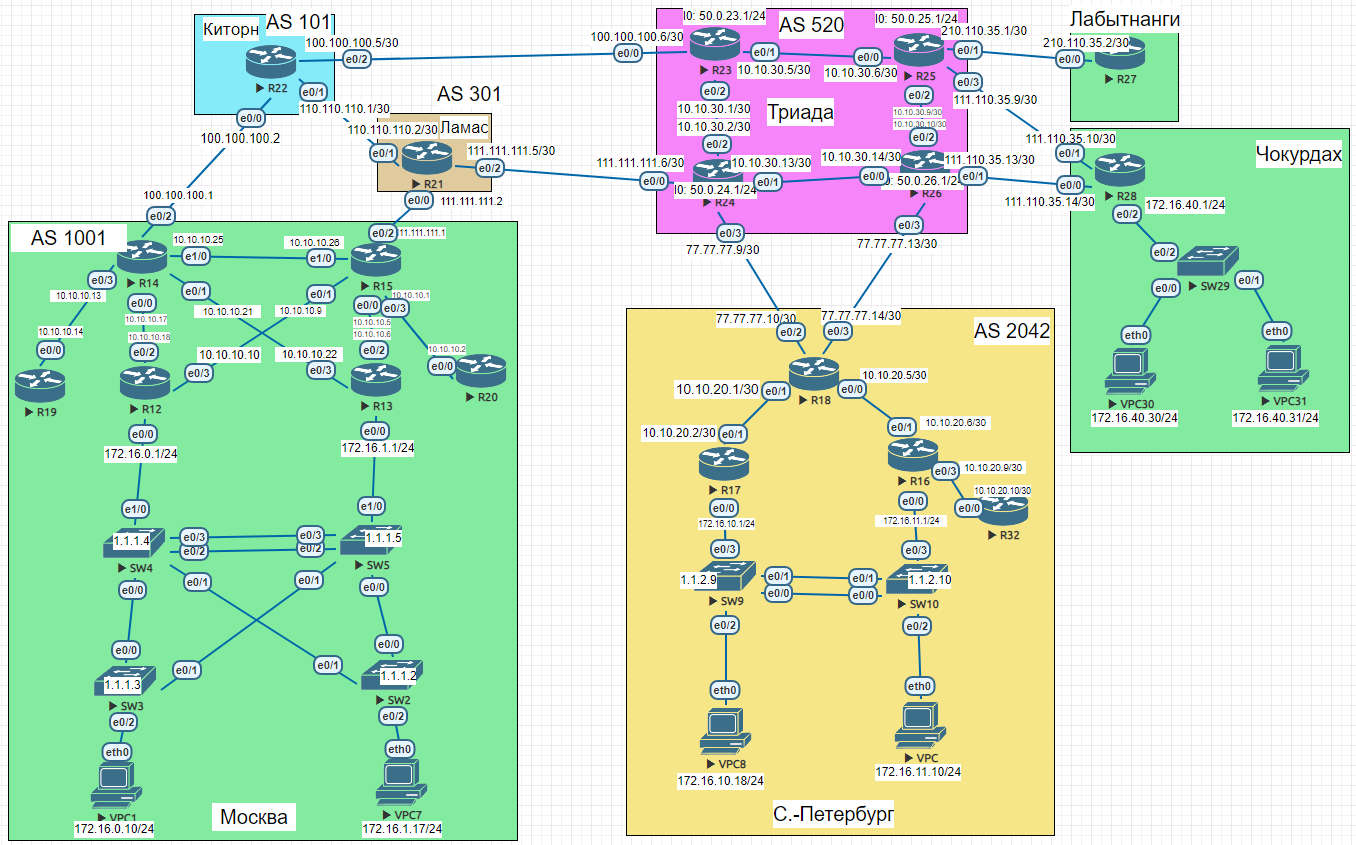
GRE — Moscow ↔ St. Petersburg
A point-to-point GRE tunnel between R15 (Moscow) and R18 (St. Petersburg) uses the public Loopback addresses from each AS as tunnel endpoints.
R15:
interface Tunnel0
 ip address 10.0.0.1 255.255.255.252
 tunnel source 200.20.20.15
 tunnel destination 100.10.8.18
R18:
interface Tunnel0
 ip address 10.0.0.2 255.255.255.252
 tunnel source 100.10.8.18
 tunnel destination 200.20.20.15
DMVPN — Moscow hub, Chokurdakh and Labytnangi spokes
R14 acts as the DMVPN hub. R28 (Chokurdakh) and R27 (Labytnangi) are spokes. Both spokes have no dedicated public address — they use the IP of their uplink interface toward Triada as the tunnel source, with ip nhrp registration no-unique to allow re-registration.
R14 — DMVPN hub
enable
configure terminal
interface Tunnel0
 description DMVPN Tunnel
 ip address 10.1.0.1 255.255.255.0
 no ip redirects
 ip mtu 1440
 ip nhrp authentication nhrp1234
 ip nhrp map multicast dynamic
 ip nhrp network-id 1
 load-interval 30
 keepalive 5 10
 tunnel source 200.20.20.14
 tunnel mode gre multipoint
end
copy running-config startup-config
R28 — DMVPN spoke (Chokurdakh)
enable
configure terminal
interface Tunnel0
 ip address 10.1.0.2 255.255.255.0
 no ip redirects
 ip mtu 1440
 ip nhrp authentication nhrp1234
 ip nhrp map multicast dynamic
 ip nhrp map 10.1.0.1 200.20.20.14
 ip nhrp map multicast 200.20.20.14
 ip nhrp network-id 1
 ip nhrp nhs 10.1.0.1
 ip nhrp registration no-unique
 load-interval 30
 keepalive 5 10
 tunnel source Ethernet0/0
 tunnel mode gre multipoint
end
copy running-config startup-config
R27 — DMVPN spoke (Labytnangi)
enable
configure terminal
interface Tunnel0
 ip address 10.1.0.3 255.255.255.0
 no ip redirects
 ip mtu 1440
 ip nhrp authentication nhrp1234
 ip nhrp map multicast dynamic
 ip nhrp map 10.1.0.1 200.20.20.14
 ip nhrp map multicast 200.20.20.14
 ip nhrp network-id 1
 ip nhrp nhs 10.1.0.1
 ip nhrp registration no-unique
 load-interval 30
 keepalive 5 10
 tunnel source Ethernet0/0
 tunnel mode gre multipoint
end
copy running-config startup-config
Verify IP connectivity
R14 — DMVPN ping + show dmvpn
R14#ping 10.1.0.1
!!!!!  Success rate is 100 percent (5/5), round-trip min/avg/max = 4/4/5 ms
R14#ping 10.1.0.2
!!!!!  Success rate is 100 percent (5/5), round-trip min/avg/max = 2/4/7 ms
R14#ping 10.1.0.3
!!!!!  Success rate is 100 percent (5/5), round-trip min/avg/max = 4/5/7 ms
R14#show dmvpn
Interface: Tunnel0, IPv4 NHRP Details
Type:Hub, NHRP Peers:3,
Ent  Peer NBMA Addr Peer Tunnel Add State  UpDn Tm Attrb

 1 UNKNOWN                10.1.0.1  NHRP    never    IX
 1 111.110.35.14          10.1.0.2    UP 00:03:22     D
 1 210.110.35.2           10.1.0.3    UP 00:03:38     D
R15 — GRE tunnel ping
R15>ping 10.0.0.2
!!!!!  Success rate is 100 percent (5/5), round-trip min/avg/max = 5/5/7 ms
R15>ping 10.0.0.1
!!!!!  Success rate is 100 percent (5/5), round-trip min/avg/max = 1/4/5 ms
Full router configs
R15 (AS 1001) — lab 15 changes
enable
configure terminal
interface Tunnel0
 ip address 10.0.0.1 255.255.255.252
 tunnel source 200.20.20.15
 tunnel destination 100.10.8.18
end
copy running-config startup-config
R18 — St. Petersburg (AS 2042) — lab 15 changes
enable
configure terminal
interface Tunnel0
 ip address 10.0.0.2 255.255.255.252
 tunnel source 100.10.8.18
 tunnel destination 200.20.20.15
end
copy running-config startup-config
R14 (AS 1001) — lab 15 changes
enable
configure terminal
interface Tunnel0
 description DMVPN Tunnel
 ip address 10.1.0.1 255.255.255.0
 no ip redirects
 ip mtu 1440
 ip nhrp authentication nhrp1234
 ip nhrp map multicast dynamic
 ip nhrp network-id 1
 load-interval 30
 keepalive 5 10
 tunnel source 200.20.20.14
 tunnel mode gre multipoint
end
copy running-config startup-config
R28 — Chokurdakh — lab 15 changes
enable
configure terminal
interface Tunnel0
 ip address 10.1.0.2 255.255.255.0
 no ip redirects
 ip mtu 1440
 ip nhrp authentication nhrp1234
 ip nhrp map multicast dynamic
 ip nhrp map 10.1.0.1 200.20.20.14
 ip nhrp map multicast 200.20.20.14
 ip nhrp network-id 1
 ip nhrp nhs 10.1.0.1
 ip nhrp registration no-unique
 load-interval 30
 keepalive 5 10
 tunnel source Ethernet0/0
 tunnel mode gre multipoint
end
copy running-config startup-config
R27 — Labytnangi — lab 15 changes
enable
configure terminal
interface Tunnel0
 ip address 10.1.0.3 255.255.255.0
 no ip redirects
 ip mtu 1440
 ip nhrp authentication nhrp1234
 ip nhrp map multicast dynamic
 ip nhrp map 10.1.0.1 200.20.20.14
 ip nhrp map multicast 200.20.20.14
 ip nhrp network-id 1
 ip nhrp nhs 10.1.0.1
 ip nhrp registration no-unique
 load-interval 30
 keepalive 5 10
 tunnel source Ethernet0/0
 tunnel mode gre multipoint
end
copy running-config startup-config
Network Engineer Course | Lab 15