Lab: Basic EIGRP for IPv4 Configuration
Topology
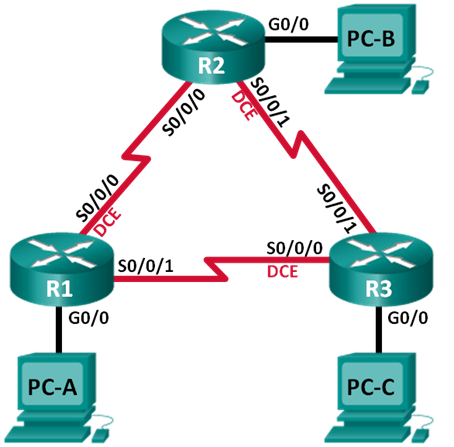
Addressing table
| Device | Interface | IP Address | Subnet Mask | Default Gateway |
|---|---|---|---|---|
| R1 | G0/0 | 192.168.1.1 | 255.255.255.0 | — |
| S0/0/0 (DCE) | 10.1.1.1 | 255.255.255.252 | — | |
| S0/0/1 | 10.3.3.1 | 255.255.255.252 | — | |
| R2 | G0/0 | 192.168.2.1 | 255.255.255.0 | — |
| S0/0/0 | 10.1.1.2 | 255.255.255.252 | — | |
| S0/0/1 (DCE) | 10.2.2.2 | 255.255.255.252 | — | |
| R3 | G0/0 | 192.168.3.1 | 255.255.255.0 | — |
| S0/0/0 (DCE) | 10.3.3.2 | 255.255.255.252 | — | |
| S0/0/1 | 10.2.2.1 | 255.255.255.252 | — | |
| PC-A | NIC | 192.168.1.3 | 255.255.255.0 | 192.168.1.1 |
| PC-B | NIC | 192.168.2.3 | 255.255.255.0 | 192.168.2.1 |
| PC-C | NIC | 192.168.3.3 | 255.255.255.0 | 192.168.3.1 |
Goals
- Part 1. Build the network and verify connectivity
- Part 2. Configure EIGRP routing
- Part 3. Verify EIGRP routing
- Part 4. Configure bandwidth and passive interfaces
Part 1 — Basic device setup
R1
enable
configure terminal
hostname R1
interface Serial0/0
 ip address 10.1.1.1 255.255.255.252
 no shutdown
interface Serial1/0
 ip address 10.3.3.1 255.255.255.252
 no shutdown
interface GigabitEthernet2/0
 ip address 192.168.1.1 255.255.255.0
 no shutdown
no ip domain-lookup
enable secret class
line vty 0 15
 logging synchronous
 password cisco
 login
line con 0
 exec-timeout 0 0
 logging synchronous
banner motd "This is a secure system. Authorized Access Only!"
do copy run start
end
copy running-config startup-config
R2
enable
configure terminal
hostname R2
interface Serial0/0
 ip address 10.1.1.2 255.255.255.252
 no shutdown
interface Serial1/0
 ip address 10.2.2.2 255.255.255.252
 no shutdown
interface GigabitEthernet2/0
 ip address 192.168.2.1 255.255.255.0
 no shutdown
no ip domain-lookup
enable secret class
line vty 0 15
 logging synchronous
 password cisco
 login
line con 0
 exec-timeout 0 0
 logging synchronous
banner motd "This is a secure system. Authorized Access Only!"
do copy run start
end
copy running-config startup-config
R3
enable
configure terminal
hostname R3
interface Serial0/0
 ip address 10.3.3.2 255.255.255.252
 no shutdown
interface Serial1/0
 ip address 10.2.2.1 255.255.255.252
 no shutdown
interface GigabitEthernet2/0
 ip address 192.168.3.1 255.255.255.0
 no shutdown
no ip domain-lookup
enable secret class
line vty 0 15
 logging synchronous
 password cisco
 login
line con 0
 exec-timeout 0 0
 logging synchronous
banner motd "This is a secure system. Authorized Access Only!"
do copy run start
end
copy running-config startup-config
Part 2 — Configure EIGRP routing
Enable EIGRP AS 10 and advertise directly connected networks on each router:
R1
enable
configure terminal
router eigrp 10
 network 10.1.1.0 0.0.0.3
 network 192.168.1.0 0.0.0.255
 network 10.3.3.0 0.0.0.3
end
copy running-config startup-config
R2
enable
configure terminal
router eigrp 10
 network 10.1.1.0 0.0.0.3
 network 192.168.2.0 0.0.0.255
 network 10.2.2.0 0.0.0.3
end
copy running-config startup-config
R3
enable
configure terminal
router eigrp 10
 network 10.2.2.0 0.0.0.3
 network 192.168.3.0 0.0.0.255
 network 10.3.3.0 0.0.0.3
end
copy running-config startup-config
Wildcard masks are recommended because IOS requires them for non-classful subnets. The mask can be omitted only when advertising a classful network (e.g. network 192.168.1.0 without mask).
Part 3 — Verify EIGRP routing
Neighbor table:
R1 — show ip eigrp neighbors
enable
configure terminal
R1(config-router)#do show ip eigrp neighbors
IP-EIGRP neighbors for process 10
H   Address         Interface      Hold Uptime    SRTT   RTO   Q   Seq
                                   (sec)          (ms)        Cnt  Num
0   10.1.1.2        Se0/0          11   00:32:24  40     1000  0   9
1   10.3.3.2        Se1/0          11   00:32:11  40     1000  0   14
end
copy running-config startup-config
R2 — show ip eigrp neighbors
enable
configure terminal
R2(config-router)#do show ip eigrp neighbors
IP-EIGRP neighbors for process 10
H   Address         Interface      Hold Uptime    SRTT   RTO   Q   Seq
                                   (sec)          (ms)        Cnt  Num
0   10.1.1.1        Se0/0          10   00:34:17  40     1000  0   9
1   10.2.2.1        Se1/0          11   00:34:04  40     1000  0   13
end
copy running-config startup-config
R3 — show ip eigrp neighbors
enable
configure terminal
R3(config)#do show ip eigrp neighbor
IP-EIGRP neighbors for process 10
H   Address         Interface      Hold Uptime    SRTT   RTO   Q   Seq
                                   (sec)          (ms)        Cnt  Num
0   10.2.2.2        Se1/0          11   00:35:19  40     1000  0   10
1   10.3.3.1        Se0/0          13   00:35:18  40     1000  0   10
end
copy running-config startup-config
Routing table:
R1 — show ip route eigrp
enable
configure terminal
R1(config-router)#do show ip route eigrp
     10.0.0.0/8 is variably subnetted, 4 subnets, 2 masks
D       10.0.0.0/8 is a summary, 00:41:44, Null0
D       10.2.2.0/30 [90/21024000] via 10.1.1.2, 00:38:32, Serial0/0
                    [90/21024000] via 10.3.3.2, 00:38:19, Serial1/0
D    192.168.2.0/24 [90/20514560] via 10.1.1.2, 00:38:32, Serial0/0
D    192.168.3.0/24 [90/20514560] via 10.3.3.2, 00:38:19, Serial1/0
end
copy running-config startup-config
R1 has two equal-cost paths to 10.2.2.0/30 because both Serial0/0 and Serial1/0 have the same default bandwidth (128 Kbps), resulting in identical metrics.
Topology table:
R1 — show ip eigrp topology
R1#show ip eigrp topology
IP-EIGRP Topology Table for AS 10/ID(192.168.1.1)
Codes: P - Passive, A - Active, U - Update, Q - Query, R - Reply,
r - Reply status
P 10.0.0.0/8, 1 successors, FD is 20512000
via Summary (20512000/0), Null0
P 10.1.1.0/30, 1 successors, FD is 20512000
via Connected, Serial0/0
P 10.2.2.0/30, 2 successors, FD is 21024000
via 10.1.1.2 (21024000/20512000), Serial0/0
via 10.3.3.2 (21024000/20512000), Serial1/0
P 10.3.3.0/30, 1 successors, FD is 20512000
via Connected, Serial1/0
P 192.168.1.0/24, 1 successors, FD is 5120
via Connected, GigabitEthernet2/0
P 192.168.2.0/24, 1 successors, FD is 20514560
via 10.1.1.2 (20514560/5120), Serial0/0
P 192.168.3.0/24, 1 successors, FD is 20514560
via 10.3.3.2 (20514560/5120), Serial1/0
No feasible successors exist because a feasible successor requires a loop-free backup path where AD < FD of the current successor — no such path exists in this symmetric triangle topology.
Protocol parameters:
R1 — show ip protocols
R1#show ip protocols
Routing Protocol is “eigrp 10”
Outgoing update filter list for all interfaces is not set
Incoming update filter list for all interfaces is not set
Default networks flagged in outgoing updates
Default networks accepted from incoming updates
EIGRP metric weight K1=1, K2=0, K3=1, K4=0, K5=0
EIGRP maximum hopcount 100
EIGRP maximum metric variance 1
Redistributing: eigrp 10
Automatic network summarization is in effect
Automatic address summarization:
10.0.0.0/8 for GigabitEthernet2/0
Summarizing with metric 20512000
Maximum path: 4
Routing for Networks:
10.1.1.0/30
192.168.1.0
10.3.3.0/30
Routing Information Sources:
Gateway         Distance      Last Update
10.1.1.2        90            3332124
10.3.3.2        90            3345257
Distance: internal 90 external 170
AS number: 10 | Advertised networks: 10.1.1.0/30, 10.3.3.0/30, 192.168.1.0 | AD internal: 90 | Max equal-cost paths: 4 (default)
Part 4 — Bandwidth and passive interfaces
Default serial bandwidth is 128 Kbps. The R1–R3 link is slower than R1–R2 and R2–R3, so set bandwidth accordingly to influence EIGRP metric:
R1 — show interface Serial0/0 (before)
R1#show interface serial 0/0
Serial0/0 is up, line protocol is up (connected)
  Hardware is HD64570
  Internet address is 10.1.1.1/30
  MTU 1500 bytes, BW 128 Kbit, DLY 20000 usec,
     reliability 255/255, txload 1/255, rxload 1/255
  Encapsulation HDLC, loopback not set, keepalive set (10 sec)
Set bandwidth on all routers — R1–R2 links: 2000 Kbps, R1–R3 link: 64 Kbps:
R1
enable
configure terminal
interface Serial0/0
 bandwidth 2000
interface Serial1/0
 bandwidth 64
end
copy running-config startup-config
R2
enable
configure terminal
interface Serial0/0
 bandwidth 2000
interface Serial1/0
 bandwidth 2000
end
copy running-config startup-config
R3
enable
configure terminal
interface Serial0/0
 bandwidth 64
interface Serial1/0
 bandwidth 2000
end
copy running-config startup-config
After changing bandwidth on R1, the routing table changes — the slow 64 Kbps link to R3 is no longer a preferred path, and 10.2.2.0/30 now has a single route via R2:
R1 — show ip route after bandwidth change
R1#show ip route
     10.0.0.0/8 is variably subnetted, 4 subnets, 2 masks
D       10.0.0.0/8 is a summary, 00:00:45, Null0
C       10.1.1.0/30 is directly connected, Serial0/0
D       10.2.2.0/30 [90/21024000] via 10.1.1.2, 00:00:42, Serial0/0
C       10.3.3.0/30 is directly connected, Serial1/0
C    192.168.1.0/24 is directly connected, GigabitEthernet2/0
D    192.168.2.0/24 [90/1794560] via 10.1.1.2, 00:00:42, Serial0/0
D    192.168.3.0/24 [90/21026560] via 10.1.1.2, 00:00:28, Serial0/0
R1 — show interface Serial0/0 (after bandwidth 2000)
R1#show interfaces serial 0/0
Serial0/0 is up, line protocol is up (connected)
  Hardware is HD64570
  Internet address is 10.1.1.1/30
  MTU 1500 bytes, BW 2000 Kbit, DLY 20000 usec,
     reliability 255/255, txload 1/255, rxload 1/255
Configure GigabitEthernet2/0 as passive on all routers — LAN interfaces don’t need to send EIGRP hello packets, but the connected network is still advertised:
router eigrp 10
 passive-interface GigabitEthernet2/0
Verify with show ip protocols — the passive interface appears in the output:
R1 — show ip protocols (with passive interface)
R1#show ip protocols
Routing Protocol is “eigrp 10”
EIGRP metric weight K1=1, K2=0, K3=1, K4=0, K5=0
EIGRP maximum hopcount 100
EIGRP maximum metric variance 1
Redistributing: eigrp 10
Automatic network summarization is in effect
Automatic address summarization:
10.0.0.0/8 for GigabitEthernet2/0
Summarizing with metric 1792000
Maximum path: 4
Routing for Networks:
10.1.1.0/30
192.168.1.0
10.3.3.0/30
Passive Interface(s):
GigabitEthernet2/0
Routing Information Sources:
Gateway         Distance      Last Update
10.1.1.2        90            7664182
10.3.3.2        90            7680578
Distance: internal 90 external 170
Review
EIGRP advantages over static routing: supports unequal-cost load balancing (variance), uses less overhead than OSPF, provides a feasible successor for near-instant failover, and supports summarization at any point in the topology.
Network Engineer Course | Lab 06