Lab: Advanced EIGRP for IPv4 Configuration
Topology
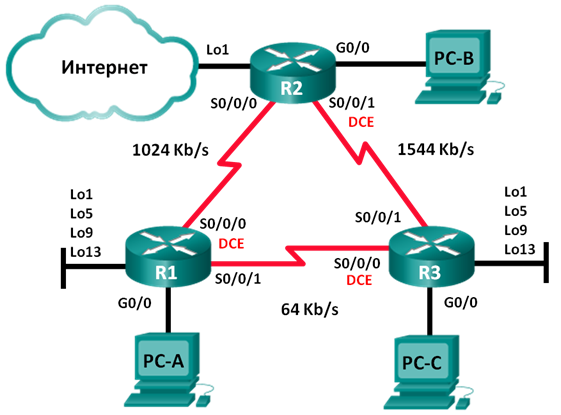
Addressing table
| Device | Interface | IP Address | Subnet Mask | Default Gateway |
|---|---|---|---|---|
| R1 | G0/0 | 192.168.1.1 | 255.255.255.0 | — |
| S0/0/0 (DCE) | 192.168.12.1 | 255.255.255.252 | — | |
| S0/0/1 | 192.168.13.1 | 255.255.255.252 | — | |
| Lo1 | 192.168.11.1 | 255.255.255.252 | — | |
| Lo5 | 192.168.11.5 | 255.255.255.252 | — | |
| Lo9 | 192.168.11.9 | 255.255.255.252 | — | |
| Lo13 | 192.168.11.13 | 255.255.255.252 | — | |
| R2 | G0/0 | 192.168.2.1 | 255.255.255.0 | — |
| S0/0/0 | 192.168.12.2 | 255.255.255.252 | — | |
| S0/0/1 (DCE) | 192.168.23.1 | 255.255.255.252 | — | |
| Lo1 | 192.168.22.1 | 255.255.255.252 | — | |
| R3 | G0/0 | 192.168.3.1 | 255.255.255.0 | — |
| S0/0/0 (DCE) | 192.168.13.2 | 255.255.255.252 | — | |
| S0/0/1 | 192.168.23.2 | 255.255.255.252 | — | |
| Lo1 | 192.168.33.1 | 255.255.255.252 | — | |
| Lo5 | 192.168.33.5 | 255.255.255.252 | — | |
| Lo9 | 192.168.33.9 | 255.255.255.252 | — | |
| Lo13 | 192.168.33.13 | 255.255.255.252 | — | |
| PC-A | NIC | 192.168.1.3 | 255.255.255.0 | 192.168.1.1 |
| PC-B | NIC | 192.168.2.3 | 255.255.255.0 | 192.168.2.1 |
| PC-C | NIC | 192.168.3.3 | 255.255.255.0 | 192.168.3.1 |
Goals
- Part 1. Build the network and configure basic device settings
- Part 2. Configure EIGRP and verify connectivity
- Part 3. Configure EIGRP for automatic summarization
- Part 4. Configure and redistribute a default static route
- Part 5. Fine-tune EIGRP: bandwidth percent, hello/hold timers
Part 1 — Basic device setup
Note: do not configure loopback interfaces yet.
R1
enable
configure terminal
hostname R1
interface Serial0/0
 ip address 192.168.12.1 255.255.255.252
 no shutdown
interface Serial1/0
 ip address 192.168.13.1 255.255.255.252
 no shutdown
interface GigabitEthernet2/0
 ip address 192.168.1.1 255.255.255.0
 no shutdown
no ip domain-lookup
enable secret class
line vty 0 15
 logging synchronous
 password cisco
 login
line con 0
 exec-timeout 0 0
 logging synchronous
banner motd "This is a secure system. Authorized Access Only!"
do copy run start
end
copy running-config startup-config
R2
enable
configure terminal
hostname R2
interface Serial0/0
 ip address 192.168.12.2 255.255.255.252
 no shutdown
interface Serial1/0
 ip address 192.168.23.1 255.255.255.252
 no shutdown
interface GigabitEthernet2/0
 ip address 192.168.2.1 255.255.255.0
 no shutdown
no ip domain-lookup
enable secret class
line vty 0 15
 logging synchronous
 password cisco
 login
line con 0
 exec-timeout 0 0
 logging synchronous
banner motd "This is a secure system. Authorized Access Only!"
do copy run start
end
copy running-config startup-config
R3
enable
configure terminal
hostname R3
interface Serial0/0
 ip address 192.168.13.2 255.255.255.252
 no shutdown
interface Serial1/0
 ip address 192.168.23.2 255.255.255.252
 no shutdown
interface GigabitEthernet2/0
 ip address 192.168.3.1 255.255.255.0
 no shutdown
no ip domain-lookup
enable secret class
line vty 0 15
 logging synchronous
 password cisco
 login
line con 0
 exec-timeout 0 0
 logging synchronous
banner motd "This is a secure system. Authorized Access Only!"
do copy run start
end
copy running-config startup-config
Part 2 — Configure EIGRP and verify connectivity
Configure EIGRP AS 1, passive LAN interface, and set bandwidth on serial links. Note: bandwidth affects EIGRP metric calculation only, not actual link speed.
R1 — EIGRP AS 1, S0/0/0 = 1024 Kbps, S0/0/1 = 64 Kbps
enable
configure terminal
router eigrp 1
 network 192.168.12.0 0.0.0.3
 network 192.168.13.0 0.0.0.3
 network 192.168.1.0 0.0.0.255
 passive-interface GigabitEthernet2/0
interface Serial0/0
 bandwidth 1024
interface Serial1/0
 bandwidth 64
end
copy running-config startup-config
R2 — EIGRP AS 1, S0/0/0 = 1024 Kbps
enable
configure terminal
router eigrp 1
 network 192.168.2.0 0.0.0.255
 network 192.168.12.0 0.0.0.3
 network 192.168.23.0 0.0.0.3
 passive-interface GigabitEthernet2/0
interface Serial0/0
 bandwidth 1024
end
copy running-config startup-config
R3 — EIGRP AS 1, S0/0/0 = 64 Kbps
enable
configure terminal
router eigrp 1
 network 192.168.3.0 0.0.0.255
 network 192.168.13.0 0.0.0.3
 network 192.168.23.0 0.0.0.3
 passive-interface GigabitEthernet2/0
interface Serial0/0
 bandwidth 64
end
copy running-config startup-config
Verify end-to-end connectivity — all PCs should ping each other:
PC-A → PC-C ping
enable
configure terminal
C:\>ping 192.168.3.3
Pinging 192.168.3.3 with 32 bytes of data:
Reply from 192.168.3.3: bytes=32 time=2ms TTL=125
Reply from 192.168.3.3: bytes=32 time=2ms TTL=125
Reply from 192.168.3.3: bytes=32 time=2ms TTL=125
Reply from 192.168.3.3: bytes=32 time=2ms TTL=125
Ping statistics for 192.168.3.3:
Packets: Sent = 4, Received = 4, Lost = 0 (0% loss),
Approximate round trip times in milli-seconds:
Minimum = 2ms, Maximum = 2ms, Average = 2ms
Part 3 — Auto-summarization
Check auto-summary default state with show ip protocols on R1:
R1 — show ip protocols (auto-summary enabled)
R1#show ip protocols
Routing Protocol is “eigrp 1”
Outgoing update filter list for all interfaces is not set
Incoming update filter list for all interfaces is not set
Default networks flagged in outgoing updates
Default networks accepted from incoming updates
EIGRP metric weight K1=1, K2=0, K3=1, K4=0, K5=0
EIGRP maximum hopcount 100
EIGRP maximum metric variance 1
Redistributing: eigrp 1
Automatic network summarization is in effect
Automatic address summarization:
192.168.12.0/24 for GigabitEthernet2/0, Serial1/0
Summarizing with metric 3011840
192.168.13.0/24 for GigabitEthernet2/0, Serial0/0
Summarizing with metric 40512000
Maximum path: 4
Routing for Networks:
192.168.12.0/30
192.168.13.0/30
192.168.1.0
Passive Interface(s):
GigabitEthernet2/0
Routing Information Sources:
Gateway         Distance      Last Update
192.168.12.2    90            4397620
192.168.13.2    90            5983078
Distance: internal 90 external 170
Auto-summary is enabled by default. Now add loopback interfaces on R1 and advertise them:
R1 — loopback addresses and EIGRP network statements
enable
configure terminal
interface Loopback1
 ip address 192.168.11.1 255.255.255.252
interface Loopback5
 ip address 192.168.11.5 255.255.255.252
interface Loopback9
 ip address 192.168.11.9 255.255.255.252
interface Loopback13
 ip address 192.168.11.13 255.255.255.252
router eigrp 1
network 192.168.11.1 0.0.0.3
network 192.168.11.5 0.0.0.3
network 192.168.11.9 0.0.0.3
network 192.168.11.13 0.0.0.3
end
copy running-config startup-config
With auto-summary active, R2 sees all four loopbacks summarized into a single classful /24:
R2 — show ip route eigrp (auto-summary active)
enable
configure terminal
R2(config-if)#do sh ip route eigrp
D    192.168.1.0/24 [90/3014400] via 192.168.12.1, 00:39:04, Serial0/0
D    192.168.3.0/24 [90/2172416] via 192.168.23.2, 00:12:37, Serial1/0
D    192.168.11.0/24 [90/3139840] via 192.168.12.1, 00:00:12, Serial0/0
     192.168.12.0/24 is variably subnetted, 2 subnets, 2 masks
D       192.168.12.0/24 is a summary, 00:39:05, Null0
D    192.168.13.0/24 [90/41024000] via 192.168.12.1, 00:14:19, Serial0/0
                     [90/41024000] via 192.168.23.2, 00:12:37, Serial1/0
     192.168.23.0/24 is variably subnetted, 2 subnets, 2 masks
D       192.168.23.0/24 is a summary, 00:12:40, Null0
end
copy running-config startup-config
Disable auto-summary on R1 — the four /30 loopbacks now appear individually:
R1 — no auto-summary
enable
configure terminal
router eigrp 1
 no auto-summary
end
copy running-config startup-config
R2 — show ip route eigrp (after no auto-summary on R1)
enable
configure terminal
R2(config)#do show ip route eigrp
D    192.168.1.0/24 [90/3014400] via 192.168.12.1, 00:00:29, Serial0/0
D    192.168.3.0/24 [90/2172416] via 192.168.23.2, 00:38:45, Serial1/0
     192.168.11.0/30 is subnetted, 3 subnets
D       192.168.11.0 [90/3139840] via 192.168.12.1, 00:00:29, Serial0/0
D       192.168.11.4 [90/3139840] via 192.168.12.1, 00:00:29, Serial0/0
D       192.168.11.12 [90/3139840] via 192.168.12.1, 00:00:29, Serial0/0
     192.168.12.0/24 is variably subnetted, 2 subnets, 2 masks
D       192.168.12.0/24 is a summary, 01:05:13, Null0
     192.168.13.0/24 is variably subnetted, 2 subnets, 2 masks
D       192.168.13.0/24 [90/41024000] via 192.168.23.2, 00:38:45, Serial1/0
D       192.168.13.0/30 [90/41024000] via 192.168.12.1, 00:00:29, Serial0/0
     192.168.23.0/24 is variably subnetted, 2 subnets, 2 masks
D       192.168.23.0/24 is a summary, 00:38:48, Null0
end
copy running-config startup-config
Repeat the same on R3 — add loopback interfaces, advertise them, disable auto-summary:
R3 — loopbacks + EIGRP + no auto-summary
enable
configure terminal
interface Loopback1
 ip address 192.168.33.1 255.255.255.252
interface Loopback5
 ip address 192.168.33.5 255.255.255.252
interface Loopback9
 ip address 192.168.33.9 255.255.255.252
interface Loopback13
 ip address 192.168.33.13 255.255.255.252
router eigrp 1
network 192.168.33.1 0.0.0.3
network 192.168.33.5 0.0.0.3
network 192.168.33.9 0.0.0.3
network 192.168.33.13 0.0.0.3
no auto-summary
end
copy running-config startup-config
Part 4 — Redistribute a default static route
Configure a loopback on R2 simulating the internet uplink, create a default static route, and redistribute it into EIGRP:
interface Loopback1
 ip address 192.168.22.1 255.255.255.252

ip route 0.0.0.0 0.0.0.0 Loopback1

router eigrp 1
 redistribute static
Verify that redistribution is active with show ip protocols on R2:
R2 — show ip protocols (redistributing static)
R2#show ip protocols
Routing Protocol is “eigrp 1”
Outgoing update filter list for all interfaces is not set
Incoming update filter list for all interfaces is not set
Default networks flagged in outgoing updates
Default networks accepted from incoming updates
Redistributing: eigrp 1, static
EIGRP-IPv4 Protocol for AS(1)
Metric weight K1=1, K2=0, K3=1, K4=0, K5=0
Router-ID: 192.168.23.1
Maximum path: 4
Routing for Networks:
192.168.2.0
192.168.12.0/30
192.168.23.0/30
Passive Interface(s):
GigabitEthernet2/0
Routing Information Sources:
Gateway         Distance      Last Update
192.168.12.1          90      00:13:20
192.168.23.2          90      00:13:20
Distance: internal 90 external 170
On R1 verify the redistributed default route — it appears as EIGRP external (EX) with AD = 170:
R1 — show ip route eigrp (default route visible)
enable
configure terminal
R1(config-router)#do show ip route eigrp
D    192.168.2.0/24 [90/3014400] via 192.168.12.2, 00:18:18, Serial0/0
D    192.168.3.0/24 [90/3526400] via 192.168.12.2, 00:13:13, Serial0/0
     ...
D*EX 0.0.0.0/0 [170/4291840] via 192.168.12.2, 00:02:08, Serial0/0
end
copy running-config startup-config
Part 5 — Fine-tune EIGRP
Bandwidth percent — limit EIGRP traffic to 75% of bandwidth on R1–R2 link, 40% on R1–R3:
R1(config)# interface Serial0/0
R1(config-if)# ip bandwidth-percent eigrp 1 75
R1(config)# interface Serial1/0
R1(config-if)# ip bandwidth-percent eigrp 1 40

R2(config)# interface Serial0/0
R2(config-if)# ip bandwidth-percent eigrp 1 75

R3(config)# interface Serial0/0
R3(config-if)# ip bandwidth-percent eigrp 1 40
Hello/hold timers — check current defaults with show ip eigrp interfaces detail:
R2 — show ip eigrp interfaces detail
R2# show ip eigrp interfaces detail
EIGRP-IPv4 Interfaces for AS(1)
                              Xmit Queue   PeerQ        Mean   Pacing Time   Multicast    Pending
Interface              Peers  Un/Reliable  Un/Reliable  SRTT   Un/Reliable   Flow Timer   Routes
Se0/0/0                  1        0/0       0/0           1       0/15          50           0
  Hello-interval is 5, Hold-time is 15
  Split-horizon is enabled
  Interface BW percentage is 75
Se0/0/1                  1        0/0       0/0           1       0/16          50           0
  Hello-interval is 5, Hold-time is 15
  Split-horizon is enabled
Default: hello = 5 s, hold-time = 15 s. Set hello = 60 s, hold-time = 180 s on all serial interfaces (hold-time must always be ≥ hello-interval):
R1
enable
configure terminal
interface Serial0/0
 ip hello-interval eigrp 1 60
 ip hold-time eigrp 1 180
interface Serial1/0
 ip hello-interval eigrp 1 60
 ip hold-time eigrp 1 180
end
copy running-config startup-config
R2
enable
configure terminal
interface Serial0/0
 ip hello-interval eigrp 1 60
 ip hold-time eigrp 1 180
interface Serial1/0
 ip hello-interval eigrp 1 60
 ip hold-time eigrp 1 180
end
copy running-config startup-config
R3
enable
configure terminal
interface Serial0/0
 ip hello-interval eigrp 1 60
 ip hold-time eigrp 1 180
interface Serial1/0
 ip hello-interval eigrp 1 60
 ip hold-time eigrp 1 180
end
copy running-config startup-config
Review
Benefits of route summarization: reduces routing table size and LSU flooding scope, less memory and CPU consumed on routers further from the summarized area. Best practice recommends disabling auto-summary and summarizing manually.
Why hold-time ≥ hello-interval: hello packets probe neighbor liveness; the neighbor is declared dead when hold-time expires without receiving a hello. If hold-time < hello-interval, neighbors would constantly flap before the next hello arrives.
Network Engineer Course | Lab 06 (Advanced)