Lab: Configuring OSPFv2 for Multiple Areas
Topology
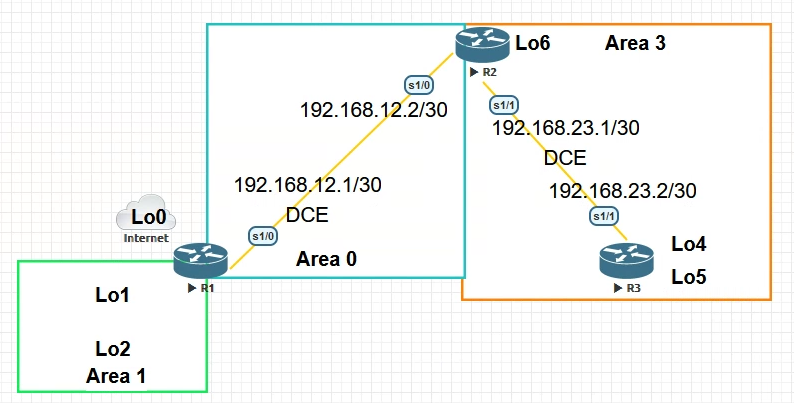
Addressing table
| Device | Interface | IP address | Subnet Mask |
|---|---|---|---|
| R1 | Loopback0 | 209.165.200.225 | 255.255.255.252 |
| Loopback1 | 192.168.1.1 | 255.255.255.0 | |
| Loopback2 | 192.168.2.1 | 255.255.255.0 | |
| Serial0/0 (DCE) | 192.168.12.1 | 255.255.255.252 | |
| R2 | Loopback6 | 192.168.6.1 | 255.255.255.0 |
| Serial0/0 | 192.168.12.2 | 255.255.255.252 | |
| Serial1/0 (DCE) | 192.168.23.1 | 255.255.255.252 | |
| R3 | Loopback4 | 192.168.4.1 | 255.255.255.0 |
| Loopback5 | 192.168.5.1 | 255.255.255.0 | |
| Serial0/0 | 192.168.23.2 | 255.255.255.252 |
Router roles
| Router | Role |
|---|---|
| R1 | ASBR, ABR, Backbone router |
| R2 | ABR, Backbone router |
| R3 | Internal router (Area 3) |
Goals
- Part 1. Build the network, configure basic device parameters
- Part 2. Configure and verify OSPFv2 multiarea
- Part 3. Configure inter-area summary routes
Part 1 — Basic device setup
R1
Enable
Configure terminal
hostname R1
interface Loopback0
 ip address 209.165.200.225 255.255.255.252
interface Loopback1
 ip address 192.168.1.1 255.255.255.0
interface Loopback2
 ip address 192.168.2.1 255.255.255.0
interface Serial0/0
 ip address 192.168.12.1 255.255.255.252
 clock rate 128000
 no shutdown
no ip domain-lookup
enable secret class
line vty 0 15
 logging synchronous
 password cisco
 login
line con 0
 logging synchronous
 password cisco
 login
banner motd "This is a secure system. Authorized Access Only!"
do copy run start
end
copy running-config startup-config
R2
Enable
Configure terminal
hostname R2
interface Loopback6
 ip address 192.168.6.1 255.255.255.0
interface Serial0/0
 ip address 192.168.12.2 255.255.255.252
 no shutdown
interface Serial1/0
 ip address 192.168.23.1 255.255.255.252
 clock rate 128000
 no shutdown
no ip domain-lookup
enable secret class
line vty 0 4
 logging synchronous
 password cisco
 login
line con 0
 logging synchronous
 password cisco
 login
banner motd "This is a secure system. Authorized Access Only!"
do copy run start
end
copy running-config startup-config
R3
enable
configure terminal
hostname R3
interface Serial0/0
 ip address 192.168.23.2 255.255.255.252
 no shutdown
interface Loopback4
 ip address 192.168.4.1 255.255.255.0
interface Loopback5
 ip address 192.168.5.1 255.255.255.0
no ip domain-lookup
enable secret class
line vty 0 4
 logging synchronous
 password cisco
 login
line con 0
 logging synchronous
 password cisco
 login
banner motd "This is a secure system. Authorized Access Only!"
do copy run start
end
copy running-config startup-config
Verify interface status:
R1 — show ip interface brief
enable
configure terminal
R1(config)#do show ip interface brief
Interface    IP-Address       OK?  Method  Status    Protocol
Serial0/0    192.168.12.1     YES  manual  up        up
Loopback0    209.165.200.225  YES  manual  up        up
Loopback1    192.168.1.1      YES  manual  up        up
Loopback2    192.168.2.1      YES  manual  up        up
end
copy running-config startup-config
R2 — show ip interface brief
enable
configure terminal
R2(config)#do show ip interface brief
Interface    IP-Address       OK?  Method  Status    Protocol
Serial0/0    192.168.12.2     YES  manual  up        up
Serial1/0    192.168.23.1     YES  manual  up        up
Loopback6    192.168.6.1      YES  manual  up        up
end
copy running-config startup-config
R3 — show ip interface brief
R3#show ip interface brief
Interface    IP-Address       OK?  Method  Status    Protocol
Serial0/0    192.168.23.2     YES  manual  up        up
Loopback4    192.168.4.1      YES  manual  up        up
Loopback5    192.168.5.1      YES  manual  up        up
Part 2 — OSPF multiarea configuration
Each loopback interface must be passive. MD5 authentication with key Cisco123 on all serial interfaces.
R1 (Area 0 + Area 1, ASBR)
enable
configure terminal
router ospf 1
 router-id 1.1.1.1
 network 192.168.1.0 0.0.0.255 area 1
 network 192.168.2.0 0.0.0.255 area 1
 network 192.168.12.0 0.0.0.3 area 0
 passive-interface Loopback0
 passive-interface Loopback1
 passive-interface Loopback2
 default-information originate
ip route 0.0.0.0 0.0.0.0 Loopback0
do clear ip ospf process
end
copy running-config startup-config
R2 (Area 0 + Area 3, ABR)
enable
configure terminal
router ospf 1
 router-id 2.2.2.2
 network 192.168.6.0 0.0.0.255 area 3
 network 192.168.12.0 0.0.0.3 area 0
 network 192.168.23.0 0.0.0.3 area 3
 passive-interface Loopback6
do clear ip ospf process
end
copy running-config startup-config
R3 (Area 3, internal)
enable
configure terminal
router ospf 1
 router-id 3.3.3.3
 network 192.168.23.0 0.0.0.3 area 3
 network 192.168.4.0 0.0.0.255 area 3
 network 192.168.5.0 0.0.0.255 area 3
 passive-interface Loopback4
 passive-interface Loopback5
do clear ip ospf process
end
copy running-config startup-config
Verify adjacency and protocol state:
show ip ospf neighbor
show ip protocols
show ip ospf interface
R1 — show ip ospf neighbor
enable
configure terminal
R1(config)#do show ip ospf neighbor
Neighbor ID  Pri  State     Dead Time  Address        Interface
2.2.2.2        0  FULL/ -   00:00:38   192.168.12.2   Serial0/0
end
copy running-config startup-config
R2 — show ip ospf neighbor
R2#show ip ospf neighbor
Neighbor ID  Pri  State     Dead Time  Address        Interface
3.3.3.3        0  FULL/ -   00:00:30   192.168.23.2   Serial1/0
1.1.1.1        0  FULL/ -   00:00:31   192.168.12.1   Serial0/0
R3 — show ip ospf neighbor
R3#show ip ospf neighbor
Neighbor ID  Pri  State     Dead Time  Address        Interface
2.2.2.2        0  FULL/ -   00:00:39   192.168.23.1   Serial0/0
R1 — show ip protocols
enable
configure terminal
R1(config)#do show ip protocols
Routing Protocol is “ospf 1”
Outgoing update filter list for all interfaces is not set
Incoming update filter list for all interfaces is not set
Router ID 1.1.1.1
It is an autonomous system boundary router
Redistributing External Routes from,
Number of areas in this router is 2. 2 normal 0 stub 0 nssa
Maximum path: 4
Routing for Networks:
192.168.1.0 0.0.0.255 area 1
192.168.2.0 0.0.0.255 area 1
192.168.12.0 0.0.0.3 area 0
Passive Interface(s):
Loopback0
Loopback1
Loopback2
Routing Information Sources:
Gateway         Distance      Last Update
1.1.1.1            110      00:00:23
2.2.2.2            110      00:08:30
192.168.6.1        110      00:10:58
209.165.200.225    110      00:09:19
Distance: (default is 110)
end
copy running-config startup-config
R2 — show ip protocols
enable
configure terminal
R2(config-router)#do show ip protocols
Routing Protocol is “ospf 1”
Outgoing update filter list for all interfaces is not set
Incoming update filter list for all interfaces is not set
Router ID 2.2.2.2
Number of areas in this router is 2. 2 normal 0 stub 0 nssa
Maximum path: 4
Routing for Networks:
192.168.23.0 0.0.0.3 area 3
192.168.6.0 0.0.0.255 area 3
192.168.12.0 0.0.0.3 area 0
Passive Interface(s):
Loopback6
Routing Information Sources:
Gateway         Distance      Last Update
1.1.1.1            110      00:01:44
2.2.2.2            110      00:09:52
3.3.3.3            110      00:09:19
192.168.5.1        110      00:10:54
192.168.6.1        110      00:12:20
209.165.200.225    110      00:10:41
Distance: (default is 110)
end
copy running-config startup-config
R3 — show ip protocols
R3#show ip protocols
Routing Protocol is “ospf 1”
Outgoing update filter list for all interfaces is not set
Incoming update filter list for all interfaces is not set
Router ID 3.3.3.3
Number of areas in this router is 1. 1 normal 0 stub 0 nssa
Maximum path: 4
Routing for Networks:
192.168.4.0 0.0.0.255 area 3
192.168.5.0 0.0.0.255 area 3
192.168.23.0 0.0.0.3 area 3
Passive Interface(s):
Loopback4
Loopback5
Routing Information Sources:
Gateway         Distance      Last Update
2.2.2.2            110      00:13:24
3.3.3.3            110      00:13:24
192.168.5.1        110      00:14:59
192.168.6.1        110      00:28:03
Distance: (default is 110)
R1 — show ip ospf interface
enable
configure terminal
R1(config)#do show ip ospf interface
Loopback1 is up, line protocol is up
Internet address is 192.168.1.1/24, Area 1
Process ID 1, Router ID 1.1.1.1, Network Type LOOPBACK, Cost: 1
Loopback interface is treated as a stub Host
Loopback2 is up, line protocol is up
Internet address is 192.168.2.1/24, Area 1
Process ID 1, Router ID 1.1.1.1, Network Type LOOPBACK, Cost: 1
Loopback interface is treated as a stub Host
Serial0/0 is up, line protocol is up
Internet address is 192.168.12.1/30, Area 0
Process ID 1, Router ID 1.1.1.1, Network Type POINT-TO-POINT, Cost: 64
end
copy running-config startup-config
Verify routing tables:
R1 — show ip route ospf
enable
configure terminal
R1(config)#do show ip route ospf
  192.168.4.0/32 is subnetted, 1 subnets
O IA  192.168.4.1 [110/129] via 192.168.12.2, 00:55:49, Serial0/0
  192.168.5.0/32 is subnetted, 1 subnets
O IA  192.168.5.1 [110/129] via 192.168.12.2, 00:55:49, Serial0/0
  192.168.6.0/32 is subnetted, 1 subnets
O IA  192.168.6.1 [110/65] via 192.168.12.2, 00:55:49, Serial0/0
  192.168.23.0/30 is subnetted, 1 subnets
O IA  192.168.23.0 [110/128] via 192.168.12.2, 00:55:49, Serial0/0
end
copy running-config startup-config
R2 — show ip route ospf
enable
configure terminal
R2(config)#do sh ip route ospf
  192.168.1.0/32 is subnetted, 1 subnets
O IA  192.168.1.1 [110/65] via 192.168.12.1, 00:56:14, Serial0/0
  192.168.2.0/32 is subnetted, 1 subnets
O IA  192.168.2.1 [110/65] via 192.168.12.1, 00:56:14, Serial0/0
  192.168.4.0/32 is subnetted, 1 subnets
O    192.168.4.1 [110/65] via 192.168.23.2, 00:55:37, Serial1/0
  192.168.5.0/32 is subnetted, 1 subnets
O    192.168.5.1 [110/65] via 192.168.23.2, 00:55:37, Serial1/0
O*E2 0.0.0.0/0 [110/1] via 192.168.12.1, 00:48:05, Serial0/0
end
copy running-config startup-config
R3 — show ip route ospf
R3#show ip route ospf
  192.168.1.0/32 is subnetted, 1 subnets
O IA  192.168.1.1 [110/129] via 192.168.23.1, 00:57:34, Serial0/0
  192.168.2.0/32 is subnetted, 1 subnets
O IA  192.168.2.1 [110/129] via 192.168.23.1, 00:57:34, Serial0/0
  192.168.6.0/32 is subnetted, 1 subnets
O    192.168.6.1 [110/65] via 192.168.23.1, 00:57:54, Serial0/0
  192.168.12.0/30 is subnetted, 1 subnets
O IA  192.168.12.0 [110/128] via 192.168.23.1, 00:57:34, Serial0/0
O*E2 0.0.0.0/0 [110/1] via 192.168.23.1, 00:48:37, Serial0/0
OSPF database — note loopbacks are advertised as /32 host routes:
R1 — show ip ospf database
enable
configure terminal
R1(config)#do show ip ospf database
        OSPF Router with ID (1.1.1.1) (Process ID 1)
Router Link States (Area 0)
Link ID    ADV Router  Age   Seq#        Checksum  Link count
1.1.1.1    1.1.1.1     1274  0x80000008  0x003e85  2
2.2.2.2    2.2.2.2     1763  0x80000006  0x00dbe6  2
Summary Net Link States (Area 0)
Link ID        ADV Router  Age   Seq#        Checksum
192.168.1.1    1.1.1.1     1763  0x80000005  0x00a644
192.168.2.1    1.1.1.1     1763  0x80000006  0x0094f4
192.168.4.1    2.2.2.2     1719  0x8000000d  0x00d4c1
192.168.5.1    2.2.2.2     1719  0x8000000e  0x00cccc
192.168.23.0   2.2.2.2     9     0x8000000f  0x00f199
192.168.6.1    2.2.2.2     9     0x80000010  0x003b9b
Router Link States (Area 1)
Link ID    ADV Router  Age   Seq#        Checksum  Link count
1.1.1.1    1.1.1.1     1274  0x80000006  0x0094c6  2
Summary Net Link States (Area 1)
Link ID        ADV Router  Age   Seq#        Checksum
192.168.12.0   1.1.1.1     1763  0x8000000b  0x00910d
192.168.23.0   1.1.1.1     1763  0x8000000c  0x0098b9
192.168.6.1    1.1.1.1     1763  0x8000000d  0x001ebb
192.168.4.1    1.1.1.1     1763  0x8000000e  0x0078e5
192.168.5.1    1.1.1.1     1763  0x8000000f  0x006bf0
Type-5 AS External Link States
Link ID  ADV Router  Age   Seq#        Checksum  Tag
0.0.0.0  1.1.1.1     1274  0x80000002  0x00fcd0  1
end
copy running-config startup-config
R2 — show ip ospf database
enable
configure terminal
R2(config)#do show ip ospf database
        OSPF Router with ID (2.2.2.2) (Process ID 1)
Router Link States (Area 0)
Link ID    ADV Router  Age   Seq#        Checksum  Link count
2.2.2.2    2.2.2.2     19    0x80000007  0x00d4e7  2
1.1.1.1    1.1.1.1     1333  0x80000008  0x003e85  2
Summary Net Link States (Area 0)
Link ID        ADV Router  Age   Seq#        Checksum
192.168.23.0   2.2.2.2     66    0x8000000f  0x00f199
192.168.6.1    2.2.2.2     66    0x80000010  0x003b9b
192.168.4.1    2.2.2.2     1777  0x8000000d  0x00d4c1
192.168.5.1    2.2.2.2     1777  0x8000000e  0x00cccc
192.168.1.1    1.1.1.1     20    0x80000005  0x00a644
192.168.2.1    1.1.1.1     20    0x80000006  0x009455
Router Link States (Area 3)
Link ID    ADV Router  Age   Seq#        Checksum  Link count
2.2.2.2    2.2.2.2     1787  0x80000009  0x00968a  3
3.3.3.3    3.3.3.3     1787  0x80000008  0x00edb1  4
Summary Net Link States (Area 3)
Link ID        ADV Router  Age   Seq#        Checksum
192.168.12.0   2.2.2.2     61    0x8000000c  0x007128
192.168.1.1    2.2.2.2     61    0x8000000d  0x00faa3
192.168.2.1    2.2.2.2     61    0x8000000e  0x00edae
Summary ASB Link States (Area 3)
Link ID    ADV Router  Age   Seq#        Checksum
1.1.1.1    2.2.2.2     1327  0x8000000b  0x007f88
Type-5 AS External Link States
Link ID  ADV Router  Age   Seq#        Checksum  Tag
0.0.0.0  1.1.1.1     1333  0x80000002  0x00fcd0  1
end
copy running-config startup-config
R3 — show ip ospf database
R3#show ip ospf database
        OSPF Router with ID (3.3.3.3) (Process ID 1)
Router Link States (Area 3)
Link ID    ADV Router  Age   Seq#        Checksum  Link count
3.3.3.3    3.3.3.3     21    0x80000009  0x00ebb2  4
2.2.2.2    2.2.2.2     21    0x8000000a  0x00948b  3
Summary Net Link States (Area 3)
Link ID        ADV Router  Age   Seq#        Checksum
192.168.12.0   2.2.2.2     96    0x8000000c  0x007128
192.168.1.1    2.2.2.2     96    0x8000000d  0x00faa3
192.168.2.1    2.2.2.2     96    0x8000000e  0x00edae
Summary ASB Link States (Area 3)
Link ID    ADV Router  Age   Seq#        Checksum
1.1.1.1    2.2.2.2     1363  0x8000000b  0x007f88
Type-5 AS External Link States
Link ID  ADV Router  Age   Seq#        Checksum  Tag
0.0.0.0  1.1.1.1     1367  0x80000002  0x00fcd0  1
MD5 authentication on serial interfaces
R1
enable
configure terminal
interface Serial0/0
 ip ospf authentication message-digest
 ip ospf message-digest-key 1 md5 Cisco123
end
copy running-config startup-config
R2
enable
configure terminal
interface Serial0/0
 ip ospf authentication message-digest
 ip ospf message-digest-key 1 md5 Cisco123
interface Serial1/0
 ip ospf authentication message-digest
 ip ospf message-digest-key 1 md5 Cisco123
end
copy running-config startup-config
R3
enable
configure terminal
interface Serial0/0
 ip ospf authentication message-digest
 ip ospf message-digest-key 1 md5 Cisco123
end
copy running-config startup-config
Verify adjacency is restored after authentication:
R1 — show ip ospf neighbor
enable
configure terminal
R1(config)#do show ip ospf neighbor
Neighbor ID  Pri  State     Dead Time  Address        Interface
2.2.2.2        0  FULL/ -   00:00:38   192.168.12.2   Serial0/0
end
copy running-config startup-config
R2 — show ip ospf neighbor
R2#show ip ospf neighbor
Neighbor ID  Pri  State     Dead Time  Address        Interface
3.3.3.3        0  FULL/ -   00:00:30   192.168.23.2   Serial1/0
1.1.1.1        0  FULL/ -   00:00:31   192.168.12.1   Serial0/0
R3 — show ip ospf neighbor
R3#show ip ospf neighbor
Neighbor ID  Pri  State     Dead Time  Address        Interface
2.2.2.2        0  FULL/ -   00:00:39   192.168.23.1   Serial0/0
Part 3 — Inter-area summarization
Without summarization each loopback in Area 1 is advertised as a separate /32 host route. Add a summary on R1 (ABR for Area 1):
R1(config)# router ospf 1
R1(config-router)# area 1 range 192.168.0.0 255.255.252.0
R3 route table before and after the Area 1 summary:
R3 — before summarization
R3#show ip route ospf
  192.168.1.0/32 is subnetted, 1 subnets
O IA  192.168.1.1 [110/129] via 192.168.23.1, 00:03:19, Serial0/0
  192.168.2.0/32 is subnetted, 1 subnets
O IA  192.168.2.1 [110/129] via 192.168.23.1, 00:03:19, Serial0/0
  192.168.6.0/32 is subnetted, 1 subnets
O    192.168.6.1 [110/65] via 192.168.23.1, 00:33:58, Serial0/0
  192.168.12.0/30 is subnetted, 1 subnets
O IA  192.168.12.0 [110/128] via 192.168.23.1, 00:33:58, Serial0/0
O*E2 0.0.0.0/0 [110/1] via 192.168.23.1, 00:33:58, Serial0/0
R3 — after area 1 range 192.168.0.0/22
R3#show ip route ospf
O IA  192.168.0.0 [110/129] via 192.168.23.1, 00:00:00, Serial0/0
  192.168.6.0/32 is subnetted, 1 subnets
O    192.168.6.1 [110/65] via 192.168.23.1, 00:33:58, Serial0/0
  192.168.12.0/30 is subnetted, 1 subnets
O IA  192.168.12.0 [110/128] via 192.168.23.1, 00:33:58, Serial0/0
O*E2 0.0.0.0/0 [110/1] via 192.168.23.1, 00:33:58, Serial0/0
Add Area 3 summary on R2 (ABR for Area 3):
R2(config)# router ospf 1
R2(config-router)# area 3 range 192.168.4.0 255.255.254.0
R1 — show ip route ospf (after area 3 range)
enable
configure terminal
R1(config-if)#do sh ip rout os
O IA  192.168.4.0 [110/129] via 192.168.12.2, 00:00:08, Serial0/0
O    192.168.6.1 [110/65] via 192.168.12.2, 00:59:53, Serial0/0
O IA  192.168.23.0 [110/128] via 192.168.12.2, 00:59:53, Serial0/0
end
copy running-config startup-config
Final route tables after both summaries applied:
R1 — show ip route ospf
R1#show ip route ospf
O IA  192.168.4.0 [110/129] via 192.168.12.2, Serial0/0
O    192.168.6.1 [110/65] via 192.168.12.2, Serial0/0
O IA  192.168.23.0 [110/128] via 192.168.12.2, Serial0/0
R2 — show ip route ospf
R2#show ip route ospf
O IA  192.168.0.0 [110/65] via 192.168.12.1, Serial0/0
O    192.168.4.1 [110/65] via 192.168.23.2, Serial1/0
O    192.168.5.1 [110/65] via 192.168.23.2, Serial1/0
O*E2 0.0.0.0/0 [110/1] via 192.168.12.1, Serial0/0
R3 — show ip route ospf
R3#show ip route ospf
O IA  192.168.0.0 [110/129] via 192.168.23.1, Serial0/0
  192.168.6.0/32 is subnetted, 1 subnets
O    192.168.6.1 [110/65] via 192.168.23.1, Serial0/0
  192.168.12.0/30 is subnetted, 1 subnets
O IA  192.168.12.0 [110/128] via 192.168.23.1, Serial0/0
O*E2 0.0.0.0/0 [110/1] via 192.168.23.1, Serial0/0
OSPF database after summarization — individual /32 host routes replaced by summary entries:
R1 — show ip ospf database
R1#show ip ospf database
        OSPF Router with ID (1.1.1.1) (Process ID 1)
Router Link States (Area 0)
Link ID    ADV Router  Age   Seq#        Checksum  Link count
1.1.1.1    1.1.1.1     856   0x80000007  0x004084  2
2.2.2.2    2.2.2.2     856   0x80000005  0x00dde5  2
Summary Net Link States (Area 0)
Link ID        ADV Router  Age   Seq#        Checksum
192.168.0.0    1.1.1.1     628   0x8000001f  0x00785d
192.168.4.0    2.2.2.2     882   0x80000009  0x00e6ba
192.168.6.1    2.2.2.2     861   0x8000000d  0x004198
192.168.23.0   2.2.2.2     861   0x8000000e  0x00f398
Router Link States (Area 1)
Link ID    ADV Router  Age   Seq#        Checksum  Link count
1.1.1.1    1.1.1.1     867   0x80000005  0x0096c5  2
Summary Net Link States (Area 1)
Link ID        ADV Router  Age   Seq#        Checksum
192.168.12.0   1.1.1.1     853   0x8000000c  0x008f0e
192.168.6.1    1.1.1.1     848   0x8000000d  0x001ebb
192.168.23.0   1.1.1.1     848   0x8000000e  0x009dbb
192.168.4.0    1.1.1.1     878   0x8000000b  0x0083df
Type-5 AS External Link States
Link ID  ADV Router  Age   Seq#        Checksum  Tag
0.0.0.0  1.1.1.1     865   0x80000003  0x00fad1  1
R2 — show ip ospf database
R2#show ip ospf database
        OSPF Router with ID (2.2.2.2) (Process ID 1)
Router Link States (Area 0)
Link ID    ADV Router  Age   Seq#        Checksum  Link count
2.2.2.2    2.2.2.2     907   0x80000005  0x00dde5  2
1.1.1.1    1.1.1.1     908   0x80000007  0x004084  2
Summary Net Link States (Area 0)
Link ID        ADV Router  Age   Seq#        Checksum
192.168.6.1    2.2.2.2     912   0x8000000d  0x004198
192.168.23.0   2.2.2.2     912   0x8000000e  0x00f398
192.168.4.0    2.2.2.2     933   0x80000009  0x00e6ba
192.168.0.0    1.1.1.1     679   0x8000001f  0x00785d
Router Link States (Area 3)
Link ID    ADV Router  Age   Seq#        Checksum  Link count
2.2.2.2    2.2.2.2     908   0x80000006  0x006cb7  3
3.3.3.3    3.3.3.3     909   0x80000007  0x00efb0  4
Summary Net Link States (Area 3)
Link ID        ADV Router  Age   Seq#        Checksum
192.168.12.0   2.2.2.2     903   0x8000000f  0x006b2b
192.168.0.0    2.2.2.2      74   0x80000010  0x00faa5
Summary ASB Link States (Area 3)
Link ID    ADV Router  Age   Seq#        Checksum
1.1.1.1    2.2.2.2     903   0x8000000e  0x00798b
Type-5 AS External Link States
Link ID  ADV Router  Age   Seq#        Checksum  Tag
0.0.0.0  1.1.1.1     917   0x80000003  0x00fad1  1
R3 — show ip ospf database
R3#show ip ospf database
        OSPF Router with ID (3.3.3.3) (Process ID 1)
Router Link States (Area 3)
Link ID    ADV Router  Age   Seq#        Checksum  Link count
3.3.3.3    3.3.3.3     981   0x80000007  0x00efb0  4
2.2.2.2    2.2.2.2     981   0x80000006  0x006cb7  3
Summary Net Link States (Area 3)
Link ID        ADV Router  Age   Seq#        Checksum
192.168.12.0   2.2.2.2     976   0x8000000f  0x006b2b
192.168.0.0    2.2.2.2     747   0x80000010  0x00faa5
Summary ASB Link States (Area 3)
Link ID    ADV Router  Age   Seq#        Checksum
1.1.1.1    2.2.2.2     976   0x8000000e  0x00798b
Type-5 AS External Link States
Link ID  ADV Router  Age   Seq#        Checksum  Tag
0.0.0.0  1.1.1.1     990   0x80000003  0x00fad1  1
Network Engineer Course | Lab 05