Lab: Configuring OSPFv2 for One Area
Topology
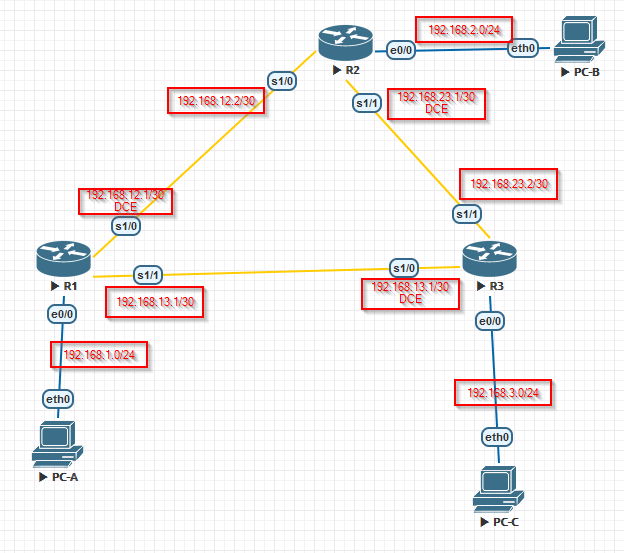
Addressing table
| Device | Interface | IP address | Subnet Mask | Gateway |
|---|---|---|---|---|
| R1 | GigabitEthernet7/0 | 192.168.1.1 | 255.255.255.0 | — |
| Serial8/0 (DCE) | 192.168.12.1 | 255.255.255.252 | — | |
| Serial9/0 | 192.168.13.1 | 255.255.255.252 | — | |
| R2 | GigabitEthernet7/0 | 192.168.2.1 | 255.255.255.0 | — |
| Serial8/0 | 192.168.12.2 | 255.255.255.252 | — | |
| Serial9/0 (DCE) | 192.168.23.1 | 255.255.255.252 | — | |
| R3 | GigabitEthernet7/0 | 192.168.3.1 | 255.255.255.0 | — |
| Serial8/0 (DCE) | 192.168.13.2 | 255.255.255.252 | — | |
| Serial9/0 | 192.168.23.2 | 255.255.255.252 | — | |
| PC-A | NIC | 192.168.1.3 | 255.255.255.0 | 192.168.1.1 |
| PC-B | NIC | 192.168.2.3 | 255.255.255.0 | 192.168.2.1 |
| PC-C | NIC | 192.168.3.3 | 255.255.255.0 | 192.168.3.1 |
Goals
- Part 1. Build the network, configure basic device parameters
- Part 2. Configure and verify OSPF routing
- Part 3. Change router IDs
- Part 4. Configure passive interfaces
- Part 5. Change the OSPF metric
Part 1 — Basic device setup
R1
Enable
Configure terminal
no ip domain-lookup
hostname R1
enable secret class
line vty 0 4
 logging synchronous
 password cisco
 login
line con 0
 exec-timeout 0 0
 logging synchronous
 password cisco
 login
banner motd "This is a secure system. Authorized Access Only!"
interface GigabitEthernet7/0
 ip address 192.168.1.1 255.255.255.0
 no shutdown
interface Serial8/0
 clock rate 128000
 ip address 192.168.12.1 255.255.255.252
 no shutdown
interface Serial9/0
 ip address 192.168.13.1 255.255.255.252
 no shutdown
end
write
end
copy running-config startup-config
R2
Enable
Configure terminal
hostname R2
no ip domain-lookup
enable secret class
line vty 0 4
 logging synchronous
 password cisco
 login
line con 0
 exec-timeout 0 0
 logging synchronous
 password cisco
 login
banner motd "This is a secure system. Authorized Access Only!"
interface Serial8/0
 ip address 192.168.12.2 255.255.255.252
 no shutdown
interface Serial9/0
 clock rate 128000
 ip address 192.168.23.1 255.255.255.252
 no shutdown
interface GigabitEthernet7/0
 ip address 192.168.2.1 255.255.255.0
 no shutdown
end
write
end
copy running-config startup-config
R3
Enable
Configure terminal
no ip domain-lookup
hostname R3
enable secret class
line vty 0 4
 logging synchronous
 password cisco
 login
line con 0
 exec-timeout 0 0
 logging synchronous
 password cisco
 login
banner motd "This is a secure system. Authorized Access Only!"
interface Serial8/0
 clock rate 128000
 ip address 192.168.13.2 255.255.255.252
 no shutdown
interface Serial9/0
 ip address 192.168.23.2 255.255.255.252
 no shutdown
interface GigabitEthernet7/0
 ip address 192.168.3.1 255.255.255.0
 no shutdown
do write
end
copy running-config startup-config
PC-A / PC-B / PC-C
set pcname PC-A
ip 192.168.1.3 24 192.168.1.1
set pcname PC-B
ip 192.168.2.3 24 192.168.2.1
set pcname PC-C
ip 192.168.3.3 24 192.168.3.1
Part 2 — Configure and verify OSPF
R1
enable
configure terminal
router ospf 1
 network 192.168.1.0 0.0.0.255 area 0
 network 192.168.12.0 0.0.0.3 area 0
 network 192.168.13.0 0.0.0.3 area 0
end
copy running-config startup-config
R2
enable
configure terminal
router ospf 1
 network 192.168.2.0 0.0.0.255 area 0
 network 192.168.12.0 0.0.0.3 area 0
 network 192.168.23.0 0.0.0.3 area 0
end
copy running-config startup-config
R3
enable
configure terminal
router ospf 1
 network 192.168.3.0 0.0.0.255 area 0
 network 192.168.13.0 0.0.0.3 area 0
 network 192.168.23.0 0.0.0.3 area 0
end
copy running-config startup-config
Verify neighbors and routing:
show ip ospf neighbor
show ip route
show ip protocols
show ip ospf
show ip ospf interface
R1 — show ip ospf neighbor
R1#show ip ospf neighbor
Neighbor ID     Pri   State           Dead Time   Address         Interface
192.168.23.1      0   FULL/  -        00:00:39    192.168.12.2    Serial8/0
192.168.23.2      0   FULL/  -        00:00:34    192.168.13.2    Serial9/0
R2 — show ip ospf neighbor
R2#show ip ospf neighbor
Neighbor ID     Pri   State           Dead Time   Address         Interface
192.168.13.1      0   FULL/  -        00:00:39    192.168.12.1    Serial8/0
192.168.23.2      0   FULL/  -        00:00:34    192.168.23.2    Serial9/0
R3 — show ip ospf neighbor
R3#show ip ospf neighbor
Neighbor ID     Pri   State           Dead Time   Address         Interface
192.168.13.1      0   FULL/  -        00:00:39    192.168.13.1    Serial8/0
192.168.23.1      0   FULL/  -        00:00:34    192.168.23.1    Serial9/0
R1 — show ip route
R1#show ip route
Codes: C - connected, S - static, I - IGRP, R - RIP, M - mobile, B - BGP
       D - EIGRP, EX - EIGRP external, O - OSPF, IA - OSPF inter area
       N1 - OSPF NSSA external type 1, N2 - OSPF NSSA external type 2
       E1 - OSPF external type 1, E2 - OSPF external type 2, E - EGP
       i - IS-IS, L1 - IS-IS level-1, L2 - IS-IS level-2, ia - IS-IS inter area
       * - candidate default, U - per-user static route, o - ODR
       P - periodic downloaded static route
Gateway of last resort is not set
C    192.168.1.0/24 is directly connected, GigabitEthernet7/0
O    192.168.2.0/24 [110/65] via 192.168.12.2, 00:01:00, Serial8/0
O    192.168.3.0/24 [110/65] via 192.168.13.2, 00:00:50, Serial9/0
192.168.12.0/30 is subnetted, 1 subnets
C       192.168.12.0 is directly connected, Serial8/0
192.168.13.0/30 is subnetted, 1 subnets
C       192.168.13.0 is directly connected, Serial9/0
192.168.23.0/30 is subnetted, 1 subnets
O       192.168.23.0 [110/128] via 192.168.12.2, Serial8/0
[110/128] via 192.168.13.2, Serial9/0
R1 — show ip protocols
R1#show ip protocols
Routing Protocol is “ospf 1”
Outgoing update filter list for all interfaces is not set
Incoming update filter list for all interfaces is not set
Router ID 192.168.13.1
Number of areas in this router is 1. 1 normal 0 stub 0 nssa
Maximum path: 4
Routing for Networks:
192.168.1.0 0.0.0.255 area 0
192.168.12.0 0.0.0.3 area 0
192.168.13.0 0.0.0.3 area 0
Routing Information Sources:
Gateway         Distance      Last Update
192.168.13.1       110      00:01:58
192.168.23.1       110      00:01:59
192.168.23.2       110      00:01:54
Distance: (default is 110)
R1 — show ip ospf
R1#show ip ospf
 Routing Process "ospf 1" with ID 192.168.13.1
 Supports only single TOS(TOS0) routes
 Supports opaque LSA
 SPF schedule delay 5 secs, Hold time between two SPFs 10 secs
 Minimum LSA interval 5 secs. Minimum LSA arrival 1 secs
 Number of external LSA 0. Checksum Sum 0x000000
 Number of opaque AS LSA 0. Checksum Sum 0x000000
 Number of DCbitless external and opaque AS LSA 0
 Number of DoNotAge external and opaque AS LSA 0
 Number of areas in this router is 1. 1 normal 0 stub 0 nssa
 External flood list length 0
    Area BACKBONE(0)
        Number of interfaces in this area is 3
        Area has no authentication
        SPF algorithm executed 3 times
        Area ranges are
        Number of LSA 3. Checksum Sum 0x00bca0
        Number of opaque link LSA 0. Checksum Sum 0x000000
        Number of DCbitless LSA 0
        Number of indication LSA 0
        Number of DoNotAge LSA 0
        Flood list length 0
R1 — show ip ospf interface
R1#show ip ospf interface
GigabitEthernet7/0 is up, line protocol is up
Internet address is 192.168.1.1/24, Area 0
Process ID 1, Router ID 192.168.13.1, Network Type BROADCAST, Cost: 1
Transmit Delay is 1 sec, State DR, Priority 1
Designated Router (ID) 192.168.13.1, Interface address 192.168.1.1
No backup designated router on this network
Timer intervals configured, Hello 10, Dead 40, Wait 40, Retransmit 5
Hello due in 00:00:04
Neighbor Count is 0, Adjacent neighbor count is 0
Serial8/0 is up, line protocol is up
Internet address is 192.168.12.1/30, Area 0
Process ID 1, Router ID 192.168.13.1, Network Type POINT-TO-POINT, Cost: 64
Transmit Delay is 1 sec, State POINT-TO-POINT,
Timer intervals configured, Hello 10, Dead 40, Wait 40, Retransmit 5
Hello due in 00:00:04
Neighbor Count is 1, Adjacent neighbor count is 1
Adjacent with neighbor 192.168.23.1
Serial9/0 is up, line protocol is up
Internet address is 192.168.13.1/30, Area 0
Process ID 1, Router ID 192.168.13.1, Network Type POINT-TO-POINT, Cost: 64
Transmit Delay is 1 sec, State POINT-TO-POINT,
Timer intervals configured, Hello 10, Dead 40, Wait 40, Retransmit 5
Hello due in 00:00:00
Neighbor Count is 1, Adjacent neighbor count is 1
Adjacent with neighbor 192.168.23.2
Verify end-to-end connectivity:
PC-A ping
enable
configure terminal
C:\>ping 192.168.1.3
Pinging 192.168.1.3 with 32 bytes of data:
Reply from 192.168.1.3: bytes=32 time<1ms TTL=128
Reply from 192.168.1.3: bytes=32 time=2ms TTL=128
Reply from 192.168.1.3: bytes=32 time=4ms TTL=128
Reply from 192.168.1.3: bytes=32 time=2ms TTL=128
Ping statistics for 192.168.1.3:
Packets: Sent = 4, Received = 4, Lost = 0 (0% loss)
C:>ping 192.168.2.3
Pinging 192.168.2.3 with 32 bytes of data:
Request timed out.
Reply from 192.168.2.3: bytes=32 time=2ms TTL=126
Reply from 192.168.2.3: bytes=32 time=1ms TTL=126
Reply from 192.168.2.3: bytes=32 time=2ms TTL=126
Ping statistics for 192.168.2.3:
Packets: Sent = 4, Received = 3, Lost = 1 (25% loss)
C:>ping 192.168.3.3
Pinging 192.168.3.3 with 32 bytes of data:
Request timed out.
Reply from 192.168.3.3: bytes=32 time=1ms TTL=126
Reply from 192.168.3.3: bytes=32 time=3ms TTL=126
Reply from 192.168.3.3: bytes=32 time=1ms TTL=126
Ping statistics for 192.168.3.3:
Packets: Sent = 4, Received = 3, Lost = 1 (25% loss)
Part 3 — Router IDs
OSPF Router ID selection order:
- Explicitly configured
router-idcommand - Highest loopback IP address
- Highest active physical interface IP
Step 1 — Loopback-based Router IDs
Configure Loopback0 on each router, then clear the OSPF process to apply:
R1
enable
configure terminal
interface Loopback0
 ip address 1.1.1.1 255.255.255.255
end
clear ip ospf process
end
copy running-config startup-config
R2
enable
configure terminal
interface Loopback0
 ip address 2.2.2.2 255.255.255.255
end
clear ip ospf process
end
copy running-config startup-config
R3
enable
configure terminal
interface Loopback0
 ip address 3.3.3.3 255.255.255.255
end
clear ip ospf process
end
copy running-config startup-config
R1 — show ip protocols (Router ID 1.1.1.1)
R1#show ip protocols
Routing Protocol is “ospf 1”
Outgoing update filter list for all interfaces is not set
Incoming update filter list for all interfaces is not set
Router ID 1.1.1.1
Number of areas in this router is 1. 1 normal 0 stub 0 nssa
Maximum path: 4
Routing for Networks:
192.168.1.0 0.0.0.255 area 0
192.168.12.0 0.0.0.3 area 0
192.168.13.0 0.0.0.3 area 0
Routing Information Sources:
Gateway         Distance      Last Update
1.1.1.1            110      00:00:42
2.2.2.2            110      00:00:47
3.3.3.3            110      00:00:42
Distance: (default is 110)
R1 — show ip ospf neighbor
R1#show ip ospf neighbor
Neighbor ID     Pri   State           Dead Time   Address         Interface
3.3.3.3           0   FULL/  -        00:00:31    192.168.13.2    Serial9/0
2.2.2.2           0   FULL/  -        00:00:35    192.168.12.2    Serial8/0
Step 2 — Explicit Router IDs
The router-id command overrides the loopback selection:
R1
enable
configure terminal
router ospf 1
 router-id 11.11.11.11
end
clear ip ospf process
end
copy running-config startup-config
R2
enable
configure terminal
router ospf 1
 router-id 22.22.22.22
end
clear ip ospf process
end
copy running-config startup-config
R3
enable
configure terminal
router ospf 1
 router-id 33.33.33.33
end
clear ip ospf process
end
copy running-config startup-config
R1 — show ip protocols (Router ID 11.11.11.11)
R1#show ip protocols
Routing Protocol is “ospf 1”
Outgoing update filter list for all interfaces is not set
Incoming update filter list for all interfaces is not set
Router ID 11.11.11.11
Number of areas in this router is 1. 1 normal 0 stub 0 nssa
Maximum path: 4
Routing for Networks:
192.168.1.0 0.0.0.255 area 0
192.168.12.0 0.0.0.3 area 0
192.168.13.0 0.0.0.3 area 0
Routing Information Sources:
Gateway         Distance      Last Update
1.1.1.1            110      00:25:30
2.2.2.2            110      00:02:00
3.3.3.3            110      00:01:16
11.11.11.11        110      00:00:39
22.22.22.22        110      00:00:51
33.33.33.33        110      00:00:39
Distance: (default is 110)
R1 — show ip ospf neighbor
R1#show ip ospf neighbor
Neighbor ID     Pri   State           Dead Time   Address         Interface
33.33.33.33       0   FULL/  -        00:00:31    192.168.13.2    Serial9/0
22.22.22.22       0   FULL/  -        00:00:35    192.168.12.2    Serial8/0
R3 — show ip ospf neighbor
enable
configure terminal
R3(config-router)#do sh ip os nei
Neighbor ID     Pri   State           Dead Time   Address         Interface
11.11.11.11       0   FULL/  -        00:00:36    192.168.13.1    Serial8/0
end
copy running-config startup-config
Part 4 — Passive interfaces
A passive interface stops sending OSPF hello packets. Use it on LAN interfaces where no OSPF neighbors exist.
Check current state before applying:
R1 — show ip ospf interface gi7/0 (before passive)
R1#show ip ospf interface gigabitEthernet 7/0
GigabitEthernet7/0 is up, line protocol is up
Internet address is 192.168.1.1/24, Area 0
Process ID 1, Router ID 192.168.13.1, Network Type BROADCAST, Cost: 1
Transmit Delay is 1 sec, State DR, Priority 1
Designated Router (ID) 192.168.13.1, Interface address 192.168.1.1
No backup designated router on this network
Timer intervals configured, Hello 10, Dead 40, Wait 40, Retransmit 5
Hello due in 00:00:09
Neighbor Count is 0, Adjacent neighbor count is 0
Configure passive interface on R1’s LAN interface:
R1(config)# router ospf 1
R1(config-router)# passive-interface GigabitEthernet7/0
Or set all interfaces passive by default and selectively activate WAN links:
R1(config-router)# passive-interface default
R1(config-router)# no passive-interface Serial8/0
R1(config-router)# no passive-interface Serial9/0
R1 — show ip ospf interface gi7/0 (after passive)
enable
configure terminal
R1(config-router)#do show ip ospf interface gigabitEthernet 7/0
GigabitEthernet7/0 is up, line protocol is up
Internet address is 192.168.1.1/24, Area 0
Process ID 1, Router ID 192.168.13.1, Network Type BROADCAST, Cost: 1
Transmit Delay is 1 sec, State WAITING, Priority 1
No designated router on this network
No backup designated router on this network
Timer intervals configured, Hello 10, Dead 40, Wait 40, Retransmit 5
No Hellos (Passive interface)
Neighbor Count is 0, Adjacent neighbor count is 0
end
copy running-config startup-config
WAN neighbors remain up:
R1 — show ip ospf neighbor
enable
configure terminal
R1(config-router)#do sh ip os neig
Neighbor ID     Pri   State           Dead Time   Address         Interface
33.33.33.33       0   FULL/  -        00:00:38    192.168.13.2    Serial9/0
22.22.22.22       0   FULL/  -        00:00:36    192.168.12.2    Serial8/0
end
copy running-config startup-config
Verify routing tables after applying passive interfaces on all routers:
R2 — show ip route
enable
configure terminal
R2(config-router)#do sh ip rou
Codes: C - connected, S - static, I - IGRP, R - RIP, M - mobile, B - BGP
       D - EIGRP, EX - EIGRP external, O - OSPF, IA - OSPF inter area
       N1 - OSPF NSSA external type 1, N2 - OSPF NSSA external type 2
       E1 - OSPF external type 1, E2 - OSPF external type 2, E - EGP
       i - IS-IS, L1 - IS-IS level-1, L2 - IS-IS level-2, ia - IS-IS inter area
       * - candidate default, U - per-user static route, o - ODR
       P - periodic downloaded static route
Gateway of last resort is not set
 2.0.0.0/32 is subnetted, 1 subnets
C 2.2.2.2 is directly connected, Loopback0
O 192.168.1.0/24 [110/65] via 192.168.12.1, 00:02:00, Serial8/0
C 192.168.2.0/24 is directly connected, GigabitEthernet7/0
O 192.168.3.0/24 [110/65] via 192.168.23.2, 00:01:50, Serial9/0
192.168.12.0/30 is subnetted, 1 subnets
C 192.168.12.0 is directly connected, Serial8/0
192.168.13.0/30 is subnetted, 1 subnets
O 192.168.13.0 [110/128] via 192.168.23.2, 00:01:50, Serial9/0
[110/128] via 192.168.12.1, 00:01:50, Serial8/0
192.168.23.0/30 is subnetted, 1 subnets
C 192.168.23.0 is directly connected, Serial9/0
end
copy running-config startup-config
R2 — show ip ospf interface S8/0 (passive)
enable
configure terminal
R2(config-router)#do show ip ospf interface S8/0
Serial8/0 is up, line protocol is up
Internet address is 192.168.12.2/30, Area 0
Process ID 1, Router ID 22.22.22.22, Network Type POINT-TO-POINT,
Transmit Delay is 1 sec, State POINT-TO-POINT,
No Hellos (Passive interface)
Neighbor Count is 0, Adjacent neighbor count is 0
end
copy running-config startup-config
R3 — show ip route
enable
configure terminal
R3(config-router)#do sh ip route
...
     3.0.0.0/32 is subnetted, 1 subnets
C       3.3.3.3 is directly connected, Loopback0
O    192.168.1.0/24 [110/65] via 192.168.13.1, 00:34:29, Serial8/0
O    192.168.2.0/24 [110/65] via 192.168.23.1, 00:02:18, Serial9/0
C    192.168.3.0/24 is directly connected, GigabitEthernet7/0
     192.168.12.0/30 is subnetted, 1 subnets
O       192.168.12.0 [110/128] via 192.168.13.1, Serial8/0
     192.168.13.0/30 is subnetted, 1 subnets
C       192.168.13.0 is directly connected, Serial8/0
     192.168.23.0/30 is subnetted, 1 subnets
C       192.168.23.0 is directly connected, Serial9/0
end
copy running-config startup-config
Part 5 — OSPF metric (cost)
OSPF cost = reference bandwidth / interface bandwidth. Default reference: 100 Mbps.
Check baseline route costs:
R1 — show ip route ospf (baseline)
R1#do sh ip rout os
O    192.168.2.0/24 [110/65] via 192.168.12.2, 00:17:18, Serial8/0
O    192.168.3.0/24 [110/65] via 192.168.13.2, 00:17:18, Serial9/0
     192.168.23.0/30 is subnetted, 1 subnets
O       192.168.23.0 [110/128] via 192.168.12.2, Serial8/0
                     [110/128] via 192.168.13.2, Serial9/0
Check serial interface bandwidth:
R1 — show interface s8/0
R1#show interface s8/0
Serial8/0 is up, line protocol is up (connected)
  Hardware is HD64570
  Internet address is 192.168.12.1/30
  MTU 1500 bytes, BW 128 Kbit, DLY 20000 usec,
Change auto-cost reference-bandwidth (apply on all routers):
router ospf 1
 auto-cost reference-bandwidth 10000
R1 — show ip ospf interface gi7/0 (Cost: 100)
enable
configure terminal
R1(config-if)#do sh ip os int gi7/0
GigabitEthernet7/0 is up, line protocol is up
Internet address is 192.168.1.1/24, Area 0
Process ID 1, Router ID 11.11.11.11, Network Type BROADCAST, Cost: 100
end
copy running-config startup-config
R1 — show ip route ospf (costs after ref-bw 10000)
R1#do sh ip rout os
O    192.168.2.0/24 [110/6477] via 192.168.12.2, 00:02:35, Serial8/0
O    192.168.3.0/24 [110/6477] via 192.168.13.2, 00:02:35, Serial9/0
     192.168.23.0/30 is subnetted, 1 subnets
O       192.168.23.0 [110/6540] via 192.168.12.2, 00:02:35, Serial8/0
                     [110/6540] via 192.168.13.2, 00:02:35, Serial9/0
Restore reference bandwidth to default on all routers:
router ospf 1
 no auto-cost reference-bandwidth
Set interface bandwidth
Increase bandwidth on Serial8/0 to reflect a faster link:
R1(config)# interface Serial8/0
R1(config-if)# bandwidth 2500
R1 — show interface s8/0 (BW 2500)
enable
configure terminal
R1(config-if)#do show interface serial 8/0
Serial8/0 is up, line protocol is up (connected)
  Hardware is HD64570
  Internet address is 192.168.12.1/30
  MTU 1500 bytes, BW 2500 Kbit, DLY 20000 usec,
end
copy running-config startup-config
R1 — show ip route ospf (after bandwidth 2500)
enable
configure terminal
R1(config-if)#do sh ip rout os
O    192.168.2.0/24 [110/41] via 192.168.12.2, 00:01:09, Serial8/0
O    192.168.3.0/24 [110/65] via 192.168.13.2, 00:21:54, Serial9/0
     192.168.23.0/30 is subnetted, 1 subnets
O       192.168.23.0 [110/104] via 192.168.12.2, 00:01:09, Serial8/0
end
copy running-config startup-config
Serial8/0 cost dropped to 40 (100000 / 2500), making it the preferred path for routes through R2.
Set ip ospf cost directly
Override cost to force traffic via Serial9/0:
R1(config)# interface Serial8/0
R1(config-if)# ip ospf cost 1565
R1 — show ip route ospf (traffic shifts to Serial9/0)
enable
configure terminal
R3(config-router)#do sh ip rout os
O    192.168.2.0/24 [110/65] via 192.168.13.2, 00:00:05, Serial9/0
O    192.168.3.0/24 [110/65] via 192.168.13.2, 00:06:13, Serial9/0
     192.168.23.0/30 is subnetted, 1 subnets
O       192.168.23.0 [110/128] via 192.168.13.2, 00:00:05, Serial9/0
end
copy running-config startup-config
Remove the override to restore load balancing:
R1(config-if)# no ip ospf cost
R1 — show ip route ospf (equal-cost restored)
R1#show ip route ospf
O    192.168.2.0/24 [110/65] via 192.168.12.2, 00:17:18, Serial8/0
O    192.168.3.0/24 [110/65] via 192.168.13.2, 00:17:18, Serial9/0
     192.168.23.0/30 is subnetted, 1 subnets
O       192.168.23.0 [110/128] via 192.168.12.2, Serial8/0
                     [110/128] via 192.168.13.2, Serial9/0
Network Engineer Course | Lab 04