Lab: Configuring HSRP (First-Hop Redundancy)
Topology
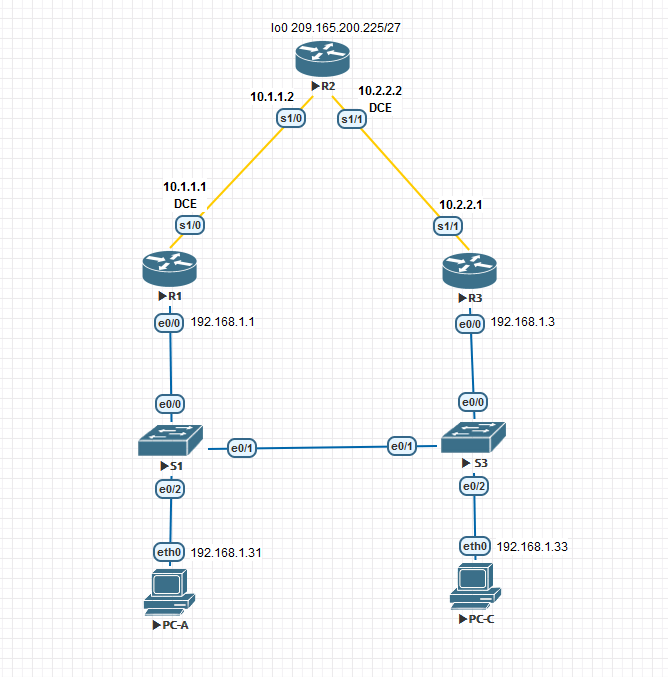
Addressing table
| Device | Interface | IP address | Subnet Mask | Gateway |
|---|---|---|---|---|
| R1 | G0/1 | 192.168.1.1 | 255.255.255.0 | — |
| S0/0/0 (DCE) | 10.1.1.1 | 255.255.255.252 | — | |
| R2 | S0/0/0 | 10.1.1.2 | 255.255.255.252 | — |
| S0/0/1 (DCE) | 10.2.2.2 | 255.255.255.252 | — | |
| Lo1 | 209.165.200.225 | 255.255.255.224 | — | |
| R3 | G0/1 | 192.168.1.3 | 255.255.255.0 | — |
| S0/0/1 | 10.2.2.1 | 255.255.255.252 | — | |
| PC-A | NIC | 192.168.1.31 | 255.255.255.0 | 192.168.1.1 |
| PC-C | NIC | 192.168.1.33 | 255.255.255.0 | 192.168.1.3 |
Goals
- Part 1. Build the network and verify connectivity
- Part 2. Configure HSRP first-hop redundancy
Part 1 — Basic router setup
R1
Enable
Configure terminal
no ip domain-lookup
hostname R1
enable secret class
service password-encryption
banner motd "This is a secure system. Authorized Access Only!"
line vty 0 4
 logging synchronous
 password cisco
 login
line con 0
 exec-timeout 0 0
 logging synchronous
 password cisco
 login
interface Serial1/0
 ip address 10.1.1.1 255.255.255.252
 clock rate 128000
 no shutdown
interface Ethernet0/0
 ip address 192.168.1.1 255.255.255.0
 duplex full
 no shutdown
do copy run start
end
copy running-config startup-config
R2
Enable
Configure terminal
no ip domain-lookup
hostname R2
enable secret class
service password-encryption
banner motd "This is a secure system. Authorized Access Only!"
line vty 0 4
 logging synchronous
 password cisco
 login
line con 0
 exec-timeout 0 0
 logging synchronous
 password cisco
 login
interface Serial1/0
 ip address 10.1.1.2 255.255.255.252
 no shutdown
interface Serial1/1
 ip address 10.2.2.2 255.255.255.252
 clock rate 128000
 no shutdown
interface Loopback0
 ip address 209.165.200.225 255.255.255.224
do copy run start
end
copy running-config startup-config
R3
Enable
Configure terminal
no ip domain-lookup
hostname R3
enable secret class
service password-encryption
banner motd "This is a secure system. Authorized Access Only!"
line vty 0 4
 logging synchronous
 password cisco
 login
line con 0
 exec-timeout 0 0
 logging synchronous
 password cisco
 login
interface Serial1/1
 ip address 10.2.2.1 255.255.255.252
 no shutdown
interface Ethernet0/0
 ip address 192.168.1.3 255.255.255.0
 duplex full
 no shutdown
do copy run start
end
copy running-config startup-config
PC-A
set pcname PC-A
ip 192.168.1.31 192.168.1.1 24
PC-C
set pcname PC-C
ip 192.168.1.33 192.168.1.3 24
RIP for Internet access
R1
enable
configure terminal
router rip
 version 2
 network 10.0.0.0
 network 192.168.1.0
 no auto-summary
end
copy running-config startup-config
R2
enable
configure terminal
router rip
 version 2
 network 10.0.0.0
 default-information originate
 no auto-summary
ip route 0.0.0.0 0.0.0.0 Loopback0
end
copy running-config startup-config
R3
enable
configure terminal
router rip
 version 2
 network 10.0.0.0
 network 192.168.1.0
 no auto-summary
end
copy running-config startup-config
Verify routing tables and ping from PCs to 209.165.200.225.
PC-A trace
PC-A> trace 209.165.200.225
1   192.168.1.1   1.555 ms
2   10.1.1.2      10.647 ms
Part 2 — HSRP configuration
HSRP provides a virtual IP address shared between R1 and R3. R1 becomes Active with priority 150; R3 becomes Standby.
R1 (Active)
enable
configure terminal
interface Ethernet0/0
 standby 1 ip 192.168.1.254
 standby version 2
 standby 1 priority 150
 standby 1 preempt
end
copy running-config startup-config
R3 (Standby)
enable
configure terminal
interface Ethernet0/0
 standby 1 ip 192.168.1.254
 standby version 2
end
copy running-config startup-config
Change default gateway on PCs and switches to the virtual IP 192.168.1.254:
PC-A
ip 192.168.1.31 192.168.1.254 24
PC-C
ip 192.168.1.33 192.168.1.254 24
S1, S3 (management gateway)
enable
configure terminal
ip default-gateway 192.168.1.254
end
copy running-config startup-config
Verification
show standby brief
R1 — Active
enable
configure terminal
R1(config-if)#do show standby brief
                     P indicates configured to preempt.
                     |
Interface   Grp  Pri P State   Active          Standby         Virtual IP
Gig6/0      1    150 P Active  local           192.168.1.3     192.168.1.254
end
copy running-config startup-config
R3 — Standby
enable
configure terminal
R3(config-if)#do sh stan bri
                     P indicates configured to preempt.
                     |
Interface   Grp  Pri P State   Active          Standby         Virtual IP
Gig9/0      1    100   Standby 192.168.1.1     local           192.168.1.254
end
copy running-config startup-config
Detailed state:
R1 show standby
enable
configure terminal
R1(config)#do sh stand
GigabitEthernet6/0 - Group 1 (version 2)
  State is Active
    12 state changes, last state change 02:02:36
  Virtual IP address is 192.168.1.254
  Active virtual MAC address is 0000.0C9F.F001
    Local virtual MAC address is 0000.0C9F.F001 (v2 default)
  Hello time 3 sec, hold time 10 sec
    Next hello sent in 0.774 secs
  Preemption enabled
  Active router is local
  Standby router is 192.168.1.3, priority 100 (expires in 8 sec)
  Priority 150 (configured 150)
  Group name is hsrp-Gig6/0-1 (default)
end
copy running-config startup-config
R3 show standby
R3#show standby
GigabitEthernet9/0 - Group 1 (version 2)
  State is Standby
    12 state changes, last state change 02:02:48
  Virtual IP address is 192.168.1.254
  Active virtual MAC address is 0000.0C9F.F001
    Local virtual MAC address is 0000.0C9F.F001 (v2 default)
  Hello time 3 sec, hold time 10 sec
    Next hello sent in 1.657 secs
  Preemption disabled
  Active router is 192.168.1.1, priority 150 (expires in 9 sec)
    MAC address is 0000.0C9F.F001
  Standby router is local
  Priority 100 (default 100)
  Group name is hsrp-Gig9/0-1 (default)
Test failover — ping 209.165.200.225 and disconnect R1’s uplink. R3 takes over after hold time expires:
PC-A ping during failover
enable
configure terminal
C:\>ping 209.165.200.225
Pinging 209.165.200.225 with 32 bytes of data:
Reply from 209.165.200.225: bytes=32 time=2ms TTL=254
Request timed out.
Reply from 209.165.200.225: bytes=32 time=2ms TTL=254
Reply from 209.165.200.225: bytes=32 time<1ms TTL=254
Ping statistics for 209.165.200.225:
Packets: Sent = 4, Received = 3, Lost = 1 (25% loss)
After R1 disconnect — R3 becomes Active:
R3 — after R1 disconnect
enable
configure terminal
R3(config-if)#do sh stan bri
                     P indicates configured to preempt.
                     |
Interface   Grp  Pri P State   Active          Standby         Virtual IP
Gig9/0      1    100 P Active  local           192.168.1.1     192.168.1.254
end
copy running-config startup-config
Changing HSRP priorities
Raise R3 priority to 200 and enable preempt:
R3(config)# interface Ethernet0/0
R3(config-if)# standby 1 priority 200
R3(config-if)# standby 1 preempt
R3 after priority change
R3#show standby brief
                     P indicates configured to preempt.
                     |
Interface   Grp  Pri P State   Active          Standby         Virtual IP
Gig9/0      1    200 P Active  local           unknown         192.168.1.254
After R1 reconnects, it remains Standby because R3’s priority (200) is now higher:
R1 — after R3 priority raised
enable
configure terminal
R1(config-if)#do sh stan bri
                     P indicates configured to preempt.
                     |
Interface   Grp  Pri P State   Active          Standby         Virtual IP
Gig6/0      1    100 P Standby 192.168.1.3     local           192.168.1.254
end
copy running-config startup-config
Key insight: Without preempt, a higher-priority router will not take over from the currently Active router. Both priority and preempt are needed.
Network Engineer Course | Lab 03