Lab: Configuring EtherChannel
Topology
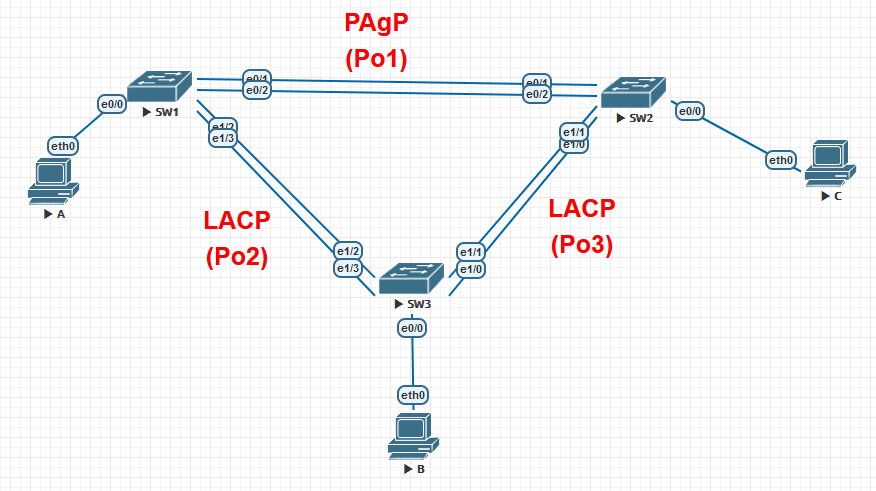
Addressing table
| Device | Interface | IP address | Subnet Mask |
|---|---|---|---|
| S1 | VLAN 99 | 192.168.99.11 | 255.255.255.0 |
| S2 | VLAN 99 | 192.168.99.12 | 255.255.255.0 |
| S3 | VLAN 99 | 192.168.99.13 | 255.255.255.0 |
| PC-A | NIC | 192.168.10.1 | 255.255.255.0 |
| PC-B | NIC | 192.168.10.2 | 255.255.255.0 |
| PC-C | NIC | 192.168.10.3 | 255.255.255.0 |
Goals
- Part 1. Configure basic switch parameters
- Part 2. Configure PAgP EtherChannel (S1–S3)
- Part 3. Configure LACP EtherChannel (S1–S2 and S2–S3)
Part 1 — Basic switch setup
S1
enable
conf t
hostname S1
no ip domain-lookup
enable secret class
banner motd "Unauthorized access is strictly prohibited!"
line console 0
exec-timeout 0 0
password cisco
logging synchronous
login
exit
line vty 0 15
password cisco
login
exit
interface range f0/1-24, g0/1-2
shutdown
exit
vlan 10
name Staff
vlan 99
name Management
exit
interface vlan 99
ip address 192.168.99.11 255.255.255.0
no shutdown
exit
interface f0/6
switchport mode access
switchport access vlan 10
no shutdown
do copy run start
end
copy running-config startup-config
S2
enable
conf t
hostname S2
no ip domain-lookup
enable secret class
banner motd "Unauthorized access is strictly prohibited!"
line console 0
exec-timeout 0 0
password cisco
logging synchronous
login
exit
line vty 0 15
password cisco
login
exit
interface range f0/1-24, g0/1-2
shutdown
exit
vlan 10
name Staff
vlan 99
name Management
exit
interface vlan 99
ip address 192.168.99.12 255.255.255.0
no shutdown
exit
interface f0/18
switchport mode access
switchport access vlan 10
no shutdown
do copy run start
end
copy running-config startup-config
S3
enable
conf t
hostname S3
no ip domain-lookup
enable secret class
banner motd "Unauthorized access is strictly prohibited!"
line console 0
exec-timeout 0 0
password cisco
logging synchronous
login
exit
line vty 0 15
password cisco
login
exit
interface range f0/1-24, g0/1-2
shutdown
exit
vlan 10
name Staff
vlan 99
name Management
exit
interface vlan 99
ip address 192.168.99.13 255.255.255.0
no shutdown
exit
interface f0/18
switchport mode access
switchport access vlan 10
no shutdown
do copy run start
end
copy running-config startup-config
Part 2 — PAgP EtherChannel (S1–S3)
PAgP (Port Aggregation Protocol) is a Cisco proprietary protocol. Modes: desirable (active negotiation) and auto (passive). At least one side must be desirable.
S1
enable
configure terminal
interface range f0/3-4
channel-group 1 mode desirable
switchport mode trunk
switchport trunk native vlan 99
no shutdown
exit
interface port-channel 1
switchport mode trunk
switchport trunk native vlan 99
switchport trunk allowed vlan 1,10,99
end
copy running-config startup-config
S3
enable
configure terminal
interface range f0/3-4
channel-group 1 mode auto
switchport mode trunk
switchport trunk native vlan 99
no shutdown
exit
interface port-channel 1
switchport mode trunk
switchport trunk native vlan 99
switchport trunk allowed vlan 1,10,99
end
copy running-config startup-config
Verify:
show etherchannel summary
S1 output
enable
configure terminal
Flags: D - down P - bundled in port-channel
I - stand-alone s - suspended
H - Hot-standby (LACP only)
R - Layer3 S - Layer2
U - in use N - not in use, no aggregation
f - failed to allocate aggregator
M - not in use, no aggregation due to minimum links not met
u - unsuitable for bundling
w - waiting to be aggregated
d - default port
A - formed by Auto LAG
Number of channel-groups in use: 1
Number of aggregators: 1
Group Port-channel Protocol Ports
——+————-+———–+———————————————-
1 Po1(SU) PAgP Et1/2(P) Et1/3(P)
end
copy running-config startup-config
Flag meanings: SU — channel is a Layer2 trunk and in use. P — port is bundled in the port-channel.
Verify STP — S3’s root port should now be Port-channel1:
show spanning-tree
S3 output
enable
configure terminal
VLAN0001
  Spanning tree enabled protocol ieee
  Root ID    Priority    32769
             Address     aabb.cc00.1000
             Cost        56
             Port        65 (Port-channel1)
             Hello Time   2 sec  Max Age 20 sec  Forward Delay 15 sec
Bridge ID  Priority    32769  (priority 32768 sys-id-ext 1)
Address     aabb.cc00.3000
Hello Time   2 sec  Max Age 20 sec  Forward Delay 15 sec
Aging Time  300 sec
Interface           Role Sts Cost      Prio.Nbr Type

Po1                 Root FWD 56        128.65   P2p
end
copy running-config startup-config
Part 3 — LACP EtherChannel (S1–S2 and S2–S3)
LACP (Link Aggregation Control Protocol) is an open standard (IEEE 802.3ad). Modes: active (sends LACP frames) and passive (responds only). At least one side must be active.
S1–S2 (channel-group 2)
S1
enable
configure terminal
interface range f0/1-2
channel-group 2 mode active
switchport mode trunk
switchport trunk native vlan 99
no shutdown
exit
interface port-channel 2
switchport mode trunk
switchport trunk native vlan 99
switchport trunk allowed vlan 1,10,99
end
copy running-config startup-config
S2
enable
configure terminal
interface range f0/1-2
channel-group 2 mode passive
switchport mode trunk
switchport trunk native vlan 99
no shutdown
exit
interface port-channel 2
switchport mode trunk
switchport trunk native vlan 99
switchport trunk allowed vlan 1,10,99
end
copy running-config startup-config
S2–S3 (channel-group 3)
S2
enable
configure terminal
interface range f0/3-4
channel-group 3 mode active
switchport mode trunk
switchport trunk native vlan 99
no shutdown
exit
interface port-channel 3
switchport mode trunk
switchport trunk native vlan 99
switchport trunk allowed vlan 1,10,99
end
copy running-config startup-config
S3
enable
configure terminal
interface range f0/1-2
channel-group 3 mode passive
switchport mode trunk
switchport trunk native vlan 99
no shutdown
exit
interface port-channel 3
switchport mode trunk
switchport trunk native vlan 99
switchport trunk allowed vlan 1,10,99
end
copy running-config startup-config
Verify all channels are up:
show etherchannel summary
S1
enable
configure terminal
Number of channel-groups in use: 2
Number of aggregators:           2
Group  Port-channel  Protocol    Ports
——+————-+———–+———————————————-
1      Po1(SU)           PAgP   Et1/2(P) Et1/3(P)
2      Po2(SU)           LACP   Et0/1(P) Et0/2(P)
end
copy running-config startup-config
S2
enable
configure terminal
Group  Port-channel  Protocol    Ports
------+-------------+-----------+----------------------------------------------
2      Po2(SU)           LACP   Fa0/1(P) Fa0/2(P)
3      Po3(SU)           LACP   Fa0/3(P) Fa0/4(P)
end
copy running-config startup-config
S3
enable
configure terminal
Group  Port-channel  Protocol    Ports
------+-------------+-----------+----------------------------------------------
1      Po1(SU)           PAgP   Et1/2(P) Et1/3(P)
3      Po3(SU)           LACP   Fa0/1(P) Fa0/2(P)
end
copy running-config startup-config
Verify connectivity — ping between PCs in VLAN 10:
PC-A> ping 192.168.10.2
PC-A> ping 192.168.10.3
Network Engineer Course | Lab 03