Lab: Troubleshooting EtherChannel
Topology
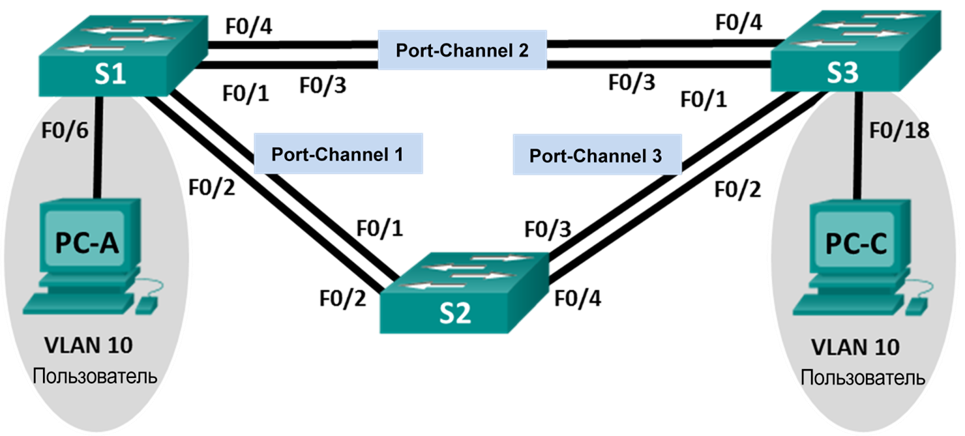
Addressing table
| Device | Interface | IP address | Subnet Mask |
|---|---|---|---|
| S1 | VLAN 99 | 192.168.1.11 | 255.255.255.0 |
| S2 | VLAN 99 | 192.168.1.12 | 255.255.255.0 |
| S3 | VLAN 99 | 192.168.1.13 | 255.255.255.0 |
| PC-A | NIC | 192.168.0.2 | 255.255.255.0 |
| PC-C | NIC | 192.168.0.3 | 255.255.255.0 |
VLAN assignments
| VLAN | Name |
|---|---|
| 10 | Users |
| 99 | Management |
Goals
- Build the network and apply the starting configuration
- Identify and fix all EtherChannel issues
Starting configuration (before troubleshooting)
S1
enable
conf t
hostname S1
interface range f0/1-24, g0/1-2
shutdown
exit
enable secret class
no ip domain lookup
line vty 0 15
password cisco
login
line con 0
 exec-t 0 0
 password cisco
 logging synchronous
 login
 exit
vlan 10
 name User
vlan 99
 Name Management
interface range f0/1-2
 switchport mode trunk
 channel-group 1 mode active
 switchport trunk native vlan 99
 no shutdown
interface range f0/3-4
 channel-group 2 mode desirable
 switchport trunk native vlan 99
 no shutdown
interface f0/6
 switchport mode access
 switchport access vlan 10
 no shutdown
interface vlan 99
 ip address 192.168.1.11 255.255.255.0
interface port-channel 1
 switchport trunk native vlan 99
 switchport mode trunk
interface port-channel 2
 switchport trunk native vlan 99
 switchport mode access
do wr
end
copy running-config startup-config
S2
enable
conf t
hostname S2
interface range f0/1-24, g0/1-2
 shutdown
 exit
enable secret class
no ip domain lookup
line vty 0 15
 password cisco
 login
line con 0
 exec-t 0 0
 password cisco
 logging synchronous
 login
 exit
vlan 10
 name User
vlan 99
 name Management
spanning-tree vlan 1,10,99 root primary
interface range f0/1-2
 switchport mode trunk
 channel-group 1 mode desirable
 switchport trunk native vlan 99
 no shutdown
interface range f0/3-4
 switchport mode trunk
 channel-group 3 mode desirable
 switchport trunk native vlan 99
interface vlan 99
 ip address 192.168.1.12 255.255.255.0
interface port-channel 1
 switchport trunk native vlan 99
 switchport trunk allowed vlan 1,99
interface port-channel 3
 switchport trunk native vlan 99
 switchport trunk allowed vlan 1,10,99
 switchport mode trunk
do wr
end
copy running-config startup-config
S3
enable
configure terminal
enab
conf t
hostname S3
interface range f0/1-24, g0/1-2
 shutdown
 exit
enable secret class
no ip domain lookup
line vty 0 15
 password cisco
 login
line con 0
 exec-t 0 0
 password cisco
 logging synchronous
 login
 exit
vlan 10
 name User
vlan 99
 name Management
interface range f0/1-2
interface range f0/3-4
 switchport mode trunk
 channel-group 3 mode desirable
 switchport trunk native vlan 99
 no shutdown
interface f0/18
 switchport mode access
 switchport access vlan 10
 no shutdown
interface vlan 99
 ip address 192.168.1.13 255.255.255.0
interface port-channel 3
 switchport trunk native vlan 99
 switchport mode trunk
do wr
end
copy running-config startup-config
Troubleshooting
Step 1 — Check EtherChannel summary
show etherchannel summary
S1
enable
configure terminal
Group  Port-channel  Protocol    Ports
------+-------------+-----------+----------------------------------------------
1      Po1(SD)           LACP   Fa0/1(I) Fa0/2(I)
2      Po2(SU)           PAgP   Fa0/3(P) Fa0/4(P)
end
copy running-config startup-config
S2
enable
configure terminal
Group  Port-channel  Protocol    Ports
------+-------------+-----------+----------------------------------------------
1      Po1(SD)           PAgP   Fa0/1(I) Fa0/2(I)
3      Po3(SD)           PAgP   Fa0/3(D) Fa0/4(D)
end
copy running-config startup-config
S3
enable
configure terminal
Group  Port-channel  Protocol    Ports
------+-------------+-----------+----------------------------------------------
3      Po3(SU)           PAgP   Fa0/3(P) Fa0/4(P)
end
copy running-config startup-config
Issue 1: S3 is missing channel-group 2. Fix:
S3(config)# int r fa0/3-4
S3(config-if-range)# channel-group 2 mode auto
Check S2’s running config to identify all issues at once:
show running-config | begin Port-channel
S2 output
enable
configure terminal
interface Port-channel1
 switchport trunk native vlan 99
 switchport trunk allowed vlan 1,99
 switchport mode trunk
!
interface Port-channel3
 switchport trunk native vlan 99
 switchport trunk allowed vlan 1,10,99
 switchport mode trunk
!
interface FastEthernet0/1
 switchport trunk native vlan 99
 switchport trunk allowed vlan 1,99
 switchport mode trunk
 channel-group 1 mode desirable
!
interface FastEthernet0/2
 switchport trunk native vlan 99
 switchport trunk allowed vlan 1,99
 switchport mode trunk
 channel-group 1 mode desirable
!
interface FastEthernet0/3
 switchport trunk native vlan 99
 switchport trunk allowed vlan 1,10,99
 switchport mode trunk
 channel-group 3 mode desirable
 shutdown
!
interface FastEthernet0/4
 switchport trunk native vlan 99
 switchport trunk allowed vlan 1,10,99
 switchport mode trunk
 channel-group 3 mode desirable
 shutdown
end
copy running-config startup-config
Issues visible in S2 config:
- Po1 allows only VLAN 1,99 (missing VLAN 10)
- Fa0/1-2 use
mode desirable(PAgP) but S1 uses LACPactive— protocol mismatch - Fa0/3-4 are shutdown
Step 2 — Check VLAN 10 access port
Po2 on S1 is in access mode — verify with show run interface:
S1 — interface Ethernet1/2
enable
configure terminal
interface Ethernet1/2
 switchport access vlan 10
 switchport mode access
 channel-group 1 mode desirable
end
EtherChannel requires all member ports to be in trunk mode. Fix:
S1(config)# interface Port-channel2
S1(config-if)# switchport mode trunk
Step 3 — Check allowed VLANs on Po1 (S1–S2)
S2 allows only VLAN 1,99 on Po1, blocking VLAN 10. Fix:
S2(config)# int r fa0/1-2
S2(config-if-range)# switchport trunk allowed vlan add 10
Step 4 — Fix protocol mismatch on Po1
S1 uses LACP active, S2 uses PAgP desirable — protocols don’t match. Fix S2 to LACP:
S2(config)# no int po1
S2(config)# int r fa0/1-2
S2(config-if-range)# no shutdown
S2(config-if-range)# channel-group 1 mode passive
S2(config-if-range)# exit
S2(config)# int po1
S2(config-if)# switchport trunk native vlan 99
S2(config-if)# switchport trunk allowed vlan 1,10,99
S2(config-if)# switchport mode trunk
Step 5 — Fix shutdown ports on S2
Fa0/3-4 on S2 are shutdown. Fix:
S2(config)# int r FastEthernet0/3-4
S2(config-if-range)# no shutdown
Bring up S3 Fa0/1-2 and add to channel-group 3:
S3(config)# int r fa0/1-2
S3(config-if-range)# no shutdown
S3(config-if-range)# switchport trunk native vlan 99
S3(config-if-range)# switchport mode trunk
S3(config-if-range)# channel-group 3 mode auto
Final verification
show etherchannel summary
S1
enable
configure terminal
1      Po1(SU)           LACP   Fa0/1(P) Fa0/2(P)
2      Po2(SU)           PAgP   Fa0/3(P) Fa0/4(P)
end
copy running-config startup-config
S2
enable
configure terminal
1      Po1(SU)           LACP   Fa0/1(P) Fa0/2(P)
3      Po3(SU)           PAgP   Fa0/3(P) Fa0/4(P)
end
copy running-config startup-config
S3
enable
configure terminal
2      Po2(SU)           PAgP   Fa0/3(P) Fa0/4(P)
3      Po3(SU)           PAgP   Fa0/1(P) Fa0/2(P)
end
copy running-config startup-config
Connectivity check — ping Management VLAN from S3:
S3
enable
configure terminal
S3(config-if)#do ping 192.168.1.13
Sending 5, 100-byte ICMP Echos to 192.168.1.13, timeout is 2 seconds:
!!!!!
Success rate is 100 percent (5/5), round-trip min/avg/max = 1/3/4 ms
S3(config-if)#do ping 192.168.1.12
Sending 5, 100-byte ICMP Echos to 192.168.1.12, timeout is 2 seconds:
.!!!!
Success rate is 60 percent (3/5), round-trip min/avg/max = 0/0/1 ms
S3(config-if)#do ping 192.168.1.11
Sending 5, 100-byte ICMP Echos to 192.168.1.11, timeout is 2 seconds:
..!!!
Success rate is 60 percent (3/5), round-trip min/avg/max = 0/1/4 ms
Connectivity check — ping between PCs:
PC-A
enable
configure terminal
C:\>ping 192.168.0.2
Pinging 192.168.0.2 with 32 bytes of data:
Reply from 192.168.0.2: bytes=32 time=3ms TTL=128
Reply from 192.168.0.2: bytes=32 time=4ms TTL=128
Reply from 192.168.0.2: bytes=32 time=1ms TTL=128
Reply from 192.168.0.2: bytes=32 time=4ms TTL=128
Ping statistics for 192.168.0.2:
Packets: Sent = 4, Received = 4, Lost = 0 (0% loss)
C:>ping 192.168.0.3
Pinging 192.168.0.3 with 32 bytes of data:
Reply from 192.168.0.3: bytes=32 time<1ms TTL=128
Reply from 192.168.0.3: bytes=32 time<1ms TTL=128
Reply from 192.168.0.3: bytes=32 time<1ms TTL=128
Reply from 192.168.0.3: bytes=32 time<1ms TTL=128
Ping statistics for 192.168.0.3:
Packets: Sent = 4, Received = 4, Lost = 0 (0% loss)
Network Engineer Course | Lab 03