Lab: Deploying a Switched Network with Redundant Links
Topology
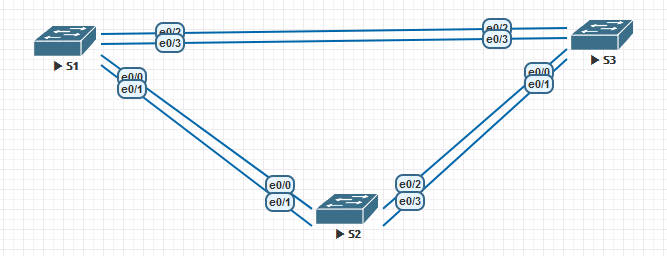
Addressing table
| Device | Interface | IP address | Subnet Mask |
|---|---|---|---|
| S1 | VLAN 1 | 192.168.1.1 | 255.255.255.0 |
| S2 | VLAN 1 | 192.168.1.2 | 255.255.255.0 |
| S3 | VLAN 1 | 192.168.1.3 | 255.255.255.0 |
Goals
- Part 1. Build the network and configure basic device parameters
- Part 2. Elect the Root bridge
- Part 3. Observe STP port selection based on port cost
- Part 4. Observe STP port selection based on port priority
Part 1 — Basic device setup
- Build the topology according to the diagram.
S1
enable
conf t
hostname S1
no ip domain-lookup
enable secret class
line console 0
password cisco
login
logging synchronous
exit
line vty 0 4
password cisco
login
exit
banner motd "**This is a secure system. Authorized Access Only!**"
interface vlan 1
ip address 192.168.1.1 255.255.255.0
no shutdown
exit
do copy run start
end
copy running-config startup-config
S2
enable
conf t
hostname S2
no ip domain-lookup
enable secret class
line console 0
password cisco
login
logging synchronous
exit
line vty 0 4
password cisco
login
exit
banner motd "**This is a secure system. Authorized Access Only!**"
interface vlan 1
ip address 192.168.1.2 255.255.255.0
no shutdown
exit
do copy run start
end
copy running-config startup-config
S3
enable
conf t
hostname S3
no ip domain-lookup
enable secret class
line console 0
password cisco
login
logging synchronous
exit
line vty 0 4
password cisco
login
exit
banner motd "**This is a secure system. Authorized Access Only!**"
interface vlan 1
ip address 192.168.1.3 255.255.255.0
no shutdown
exit
do copy run start
end
copy running-config startup-config
- Verify connectivity — ping all switches from S1:
ping 192.168.1.1
ping 192.168.1.2
ping 192.168.1.3
S1 ping output
S1#ping 192.168.1.1
!!!!!
Success rate is 100 percent (5/5)
S1#ping 192.168.1.2
.!!!!
Success rate is 80 percent (4/5)
S1#ping 192.168.1.3
.!!!!
Success rate is 80 percent (4/5)
Part 2 — Root bridge election
First disable all ports, then bring up only Et0/0 and Et0/2 as trunks:
S1
enable
configure terminal
interface range Ethernet 0/0 - 3
shutdown
exit
interface range Ethernet 0/0, Ethernet 0/2
switchport trunk encapsulation dot1q
switchport mode trunk
no shutdown
end
copy running-config startup-config
S2
enable
configure terminal
interface range Ethernet 0/0 - 3
shutdown
exit
interface range Ethernet 0/0, Ethernet 0/2
switchport trunk encapsulation dot1q
switchport mode trunk
no shutdown
end
copy running-config startup-config
S3
enable
configure terminal
interface range Ethernet 0/0 - 3
shutdown
exit
interface range Ethernet 0/0, Ethernet 0/2
switchport trunk encapsulation dot1q
switchport mode trunk
no shutdown
end
copy running-config startup-config
Check STP state on each switch:
show spanning-tree
The switch with the lowest Bridge ID (priority + MAC) becomes the Root bridge. With equal default priority (32768), the switch with the lowest MAC wins. Here S1 has the lowest MAC and is elected Root.
S1 — Root bridge
S1#show spanning-tree
VLAN0001
  Spanning tree enabled protocol ieee
  Root ID    Priority    32769
             Address     aabb.cc00.1100
             This bridge is the root
             Hello Time   2 sec  Max Age 20 sec  Forward Delay 15 sec
Bridge ID  Priority    32769  (priority 32768 sys-id-ext 1)
Address     aabb.cc00.1100
Hello Time   2 sec  Max Age 20 sec  Forward Delay 15 sec
Aging Time  300 sec
Interface           Role Sts Cost      Prio.Nbr Type

Et0/0               Desg FWD 100       128.1    Shr
Et0/2               Desg FWD 100       128.3    Shr
S2 — non-root, root port Et0/0
S2#show spanning-tree
VLAN0001
  Spanning tree enabled protocol ieee
  Root ID    Priority    32769
             Address     aabb.cc00.1100
             Cost        100
             Port        1 (Ethernet0/0)
             Hello Time   2 sec  Max Age 20 sec  Forward Delay 15 sec
Bridge ID  Priority    32769  (priority 32768 sys-id-ext 1)
Address     aabb.cc00.2200
Hello Time   2 sec  Max Age 20 sec  Forward Delay 15 sec
Aging Time  300 sec
Interface           Role Sts Cost      Prio.Nbr Type

Et0/0               Root FWD 100       128.1    Shr
Et0/2               Desg FWD 100       128.3    Shr
S3 — non-root, blocked port Et0/0
S3#show spanning-tree
VLAN0001
  Spanning tree enabled protocol ieee
  Root ID    Priority    32769
             Address     aabb.cc00.1100
             Cost        100
             Port        3 (Ethernet0/2)
             Hello Time   2 sec  Max Age 20 sec  Forward Delay 15 sec
Bridge ID  Priority    32769  (priority 32768 sys-id-ext 1)
Address     aabb.cc00.3300
Hello Time   2 sec  Max Age 20 sec  Forward Delay 15 sec
Aging Time  300 sec
Interface           Role Sts Cost      Prio.Nbr Type

Et0/0               Altn BLK 100       128.1    Shr
Et0/2               Root FWD 100       128.3    Shr
Port roles explained:
- Root — best path toward the Root bridge (one per non-root switch)
- Designated — best port on a segment for forwarding toward the root (all Root bridge ports + one per segment)
- Alternate — blocked to prevent loops
S3’s Et0/0 (toward S2) is blocked because both S3 and S2 have equal cost to root (100), but S2 has a lower Bridge ID — so S2’s Et0/2 wins the Designated role, and S3’s Et0/0 is placed into Alternate (blocking).
Part 3 — Port selection based on cost
Lower path cost to root wins. Default cost for 10 Mbps Ethernet is 100.
S3 currently has its Et0/0 (toward S2) blocked. Lower the cost on S3’s root port (Et0/2) to 90 — this makes S3’s path to root cheaper than S2’s:
S3
enable
configure terminal
interface Ethernet 0/2
spanning-tree cost 90
end
copy running-config startup-config
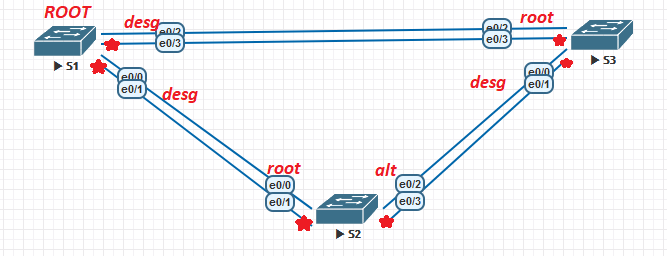
Now S3 can reach root via Et0/2 at cost 90, while S2 reaches root at cost 100. On the S2–S3 segment, S3 becomes the designated switch — S2’s Et0/2 moves to Alternate (blocking).
S3 — after cost change
S3#show spanning-tree
VLAN0001
  Root ID    Priority    32769
             Address     aabb.cc00.1100
             Cost        90
             Port        3 (Ethernet0/2)
...
Interface           Role Sts Cost      Prio.Nbr Type
------------------- ---- --- --------- -------- --------------------------------
Et0/0               Desg FWD 100       128.1    Shr
Et0/2               Root FWD 90        128.3    Shr
Revert the cost change:
S3
enable
configure terminal
interface Ethernet 0/2
no spanning-tree cost
end
copy running-config startup-config
Part 4 — Port selection based on port priority
Enable the redundant interfaces on all switches to bring up parallel links:
S1, S2, S3
enable
configure terminal
interface range Ethernet 0/1, Ethernet 0/3
switchport trunk encapsulation dot1q
switchport mode trunk
no shutdown
end
copy running-config startup-config
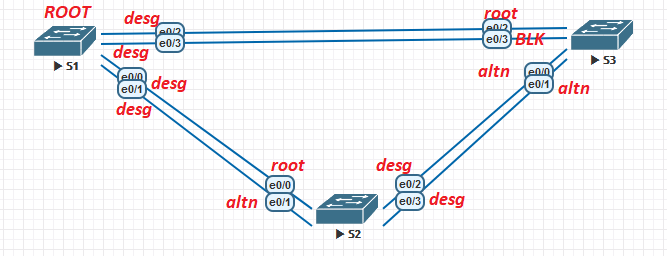
Now each pair of switches has two parallel links. STP must block one per segment. When path costs are equal, STP prefers the port with the lowest port ID (priority × 256 + port number). With equal priority (128), the lower interface number wins.
Check the new STP state:
S1 — all ports Designated (Root bridge)
S1#show spanning-tree
VLAN0001
  Root ID    Priority    32769
             Address     aabb.cc00.1100
             This bridge is the root
...
Interface           Role Sts Cost      Prio.Nbr Type
------------------- ---- --- --------- -------- --------------------------------
Et0/0               Desg FWD 100       128.1    Shr
Et0/1               Desg FWD 100       128.2    Shr
Et0/2               Desg FWD 100       128.3    Shr
Et0/3               Desg FWD 100       128.4    Shr
S2 — Et0/0 Root, Et0/1 Alternate
S2#show spanning-tree
...
Interface           Role Sts Cost      Prio.Nbr Type
------------------- ---- --- --------- -------- --------------------------------
Et0/0               Root FWD 100       128.1    Shr
Et0/1               Altn BLK 100       128.2    Shr
Et0/2               Desg FWD 100       128.3    Shr
Et0/3               Desg FWD 100       128.4    Shr
S3 — Et0/2 Root, all others Alternate
S3#show spanning-tree
...
Interface           Role Sts Cost      Prio.Nbr Type
------------------- ---- --- --------- -------- --------------------------------
Et0/0               Altn BLK 100       128.1    Shr
Et0/1               Altn BLK 100       128.2    Shr
Et0/2               Root FWD 100       128.3    Shr
Et0/3               Altn BLK 100       128.4    Shr
S2 has two paths to root (Et0/0 and Et0/1 both go to S1). Et0/0 wins because its port number is lower (port ID 128.1 < 128.2). Et0/1 is blocked.
S3 has four ports: Et0/2 and Et0/3 connect to S1, Et0/0 and Et0/1 connect to S2. Et0/2 (direct to root, lower number) is elected Root port. All others block because the designated role on those segments belongs to S1 or S2.
Network Engineer Course | Lab 02