Lab: Configuring Extended VLAN, VTP and DTP
Topology
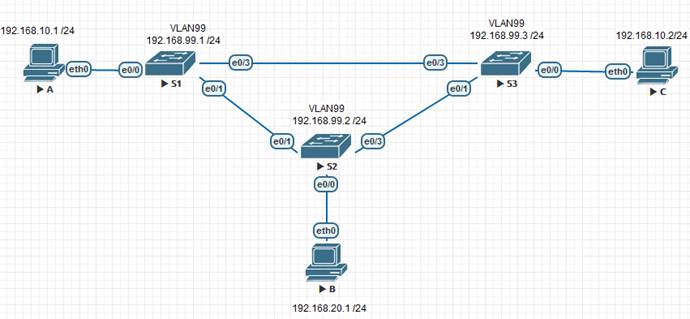
Addressing table
| Device | Interface | IP address | Subnet Mask |
|---|---|---|---|
| S1 | VLAN 99 | 192.168.99.1 | 255.255.255.0 |
| S2 | VLAN 99 | 192.168.99.2 | 255.255.255.0 |
| S3 | VLAN 99 | 192.168.99.3 | 255.255.255.0 |
| PC-A | NIC | 192.168.10.1 | 255.255.255.0 |
| PC-B | NIC | 192.168.20.1 | 255.255.255.0 |
| PC-C | NIC | 192.168.10.2 | 255.255.255.0 |
Goals
- Configure VTP, DTP and trunk links between switches
- S2 acts as VTP server; S1 and S3 as clients
- Add VLANs and assign ports
- Configure extended-range VLANs on S1 in VTP transparent mode
Part 1 — Basic device setup
- Build the network according to the topology.
S1
Enable
Configure terminal
interface vlan 1
ip address 192.168.1.1 255.255.255.0
no shutdown
exit
hostname S1
do copy run start
end
copy running-config startup-config
S2
Enable
Configure terminal
interface vlan 1
ip address 192.168.1.2 255.255.255.0
no shutdown
exit
hostname S2
do copy run start
end
copy running-config startup-config
S3
Enable
Configure terminal
interface vlan 1
ip address 192.168.1.3 255.255.255.0
no shutdown
exit
hostname S3
do copy run start
end
copy running-config startup-config
- Disable DNS lookup on each switch:
no ip domain-lookup
- Set privileged and console passwords, enable logging synchronous:
S1, S2, S3
enable
configure terminal
no ip domain-lookup
enable secret cisco
line console 0
password cisco
login
logging synchronous
end
copy running-config startup-config
- Set a login banner:
S1, S2, S3
enable
configure terminal
Banner motd "**This is a secure system. Authorized Access Only!
end
copy running-config startup-config
Part 2 — VTP configuration
S1 (client)
enable
configure terminal
vtp domain CCNA
vtp password cisco
vtp version 3
vtp mode client
end
copy running-config startup-config
S2 (server)
enable
configure terminal
vtp domain CCNA
vtp password cisco
vtp version 3
vtp mode server
end
vtp primary server force
end
copy running-config startup-config
S3 (client)
enable
configure terminal
vtp domain CCNA
vtp password cisco
vtp version 3
vtp mode client
end
copy running-config startup-config
Part 3 — DTP and trunk ports
Dynamic trunk: S1 — S2
Set S1’s port toward S2 to dynamic desirable. S2 defaults to dynamic auto — the trunk forms automatically:
S1
enable
configure terminal
interface Ethernet 0/1
switchport trunk encapsulation dot1q
switchport mode dynamic desirable
end
copy running-config startup-config
Static trunks: S1 — S3 and S2 — S3
S1
enable
configure terminal
interface Ethernet 0/3
switchport trunk encapsulation dot1q
switchport mode trunk
end
copy running-config startup-config
S2
enable
configure terminal
interface Ethernet 0/3
switchport trunk encapsulation dot1q
switchport mode trunk
end
copy running-config startup-config
S3
enable
configure terminal
interface Ethernet 0/1
switchport trunk encapsulation dot1q
switchport mode trunk
interface Ethernet 0/3
switchport trunk encapsulation dot1q
switchport mode trunk
end
copy running-config startup-config
Verify trunks on S1:
show interfaces trunk
S1 output
enable
configure terminal
Port        Mode             Encapsulation  Status        Native vlan
Et0/1       desirable        802.1q         trunking      1
Et0/3       on               802.1q         trunking      1
end
copy running-config startup-config
Part 4 — Create VLANs on the server
S2
enable
configure terminal
vlan 10
name Red
vlan 20
name Blue
vlan 30
name Yellow
vlan 99
name Management
end
copy running-config startup-config
Verify VLANs propagated to clients:
S1 — show vlan brief
enable
configure terminal
VLAN Name                             Status    Ports
---- -------------------------------- --------- -------------------------------
1    default                          active    Et0/2
10   Red                              active
20   Blue                             active
30   Yellow                           active
99   Management                       active
end
copy running-config startup-config
S3 — show vlan brief
enable
configure terminal
VLAN Name                             Status    Ports
---- -------------------------------- --------- -------------------------------
1    default                          active    Et0/2
10   Red                              active
20   Blue                             active
30   Yellow                           active
99   Management                       active
end
copy running-config startup-config
Part 5 — Assign ports to VLANs
Assign access ports and configure the Management SVI on all switches.
| Switch | Interface | VLAN | Host |
|---|---|---|---|
| S1 | Et0/0 | 10 | PC-A |
| S2 | Et0/0 | 20 | PC-B |
| S3 | Et0/0 | 10 | PC-C |
S1
enable
configure terminal
interface Ethernet 0/0
switchport mode access
switchport access vlan 10
interface vlan 99
ip address 192.168.99.1 255.255.255.0
no shutdown
end
copy running-config startup-config
S2
enable
configure terminal
interface Ethernet 0/0
switchport mode access
switchport access vlan 20
interface vlan 99
ip address 192.168.99.2 255.255.255.0
no shutdown
end
copy running-config startup-config
S3
enable
configure terminal
interface Ethernet 0/0
switchport mode access
switchport access vlan 10
interface vlan 99
ip address 192.168.99.3 255.255.255.0
no shutdown
end
copy running-config startup-config
Part 6 — Connectivity check
PC-A and PC-C are both in VLAN 10 — verify reachability:
PC-A
VPCS> ping 192.168.10.2
84 bytes from 192.168.10.2 icmp_seq=1 ttl=64 time=0.506 ms
84 bytes from 192.168.10.2 icmp_seq=2 ttl=64 time=0.802 ms
84 bytes from 192.168.10.2 icmp_seq=3 ttl=64 time=0.513 ms
84 bytes from 192.168.10.2 icmp_seq=4 ttl=64 time=0.761 ms
84 bytes from 192.168.10.2 icmp_seq=5 ttl=64 time=0.880 ms
Verify Management VLAN reachability from S2:
S2
enable
configure terminal
S2(config-if)#do ping 192.168.99.1
Sending 5, 100-byte ICMP Echos to 192.168.99.1, timeout is 2 seconds:
.!!!!
Success rate is 80 percent (4/5), round-trip min/avg/max = 1/1/1 ms
S2(config-if)#do ping 192.168.99.2
Sending 5, 100-byte ICMP Echos to 192.168.99.2, timeout is 2 seconds:
!!!!!
Success rate is 100 percent (5/5), round-trip min/avg/max = 4/4/4 ms
S2(config-if)#do ping 192.168.99.3
Sending 5, 100-byte ICMP Echos to 192.168.99.3, timeout is 2 seconds:
.!!!!
Success rate is 80 percent (4/5), round-trip min/avg/max = 1/1/1 ms
Part 7 — Extended VLAN
Extended-range VLANs (1025–4096) cannot be managed via VTP — the switch must be in transparent mode first.
Switch S1 to VTP transparent:
S1
enable
configure terminal
vtp mode transparent
end
copy running-config startup-config
Verify:
show vtp status
S1 output
enable
configure terminal
VTP Version capable             : 1 to 3
VTP version running             : 1
VTP Domain Name                 : CCNA
VTP Pruning Mode                : Disabled
VTP Traps Generation            : Disabled
Feature VLAN:
--------------
VTP Operating Mode                : Transparent
Maximum VLANs supported locally   : 255
Number of existing VLANs          : 9
Configuration Revision            : 0
end
copy running-config startup-config
Create extended VLAN 2000:
S1
enable
configure terminal
vlan 2000
end
Verify:
show vlan brief
S1 output
enable
configure terminal
VLAN Name                             Status    Ports
---- -------------------------------- --------- -------------------------------
1    default                          active    Et0/2
10   Red                              active    Et0/0
20   Blue                             active
30   Yellow                           active
99   Management                       active
1002 fddi-default                     act/unsup
1003 trcrf-default                    act/unsup
1004 fddinet-default                  act/unsup
1005 trbrf-default                    act/unsup
2000 VLAN2000                         active
end
copy running-config startup-config
Network Engineer Course | Lab 01